Best Copy Trading Platforms 2026
Copy trading lets you automatically mirror the trades of experienced traders in real time, using your own capital. The best platforms in 2026 combine regulatory oversight, transparent signal-provider...
Reviewed using our forex & CFD broker review methodology
Checked on: 2026-08-17 | Broker terms, regulation, and pricing can change. Always verify at the official PU Prime site before opening an account.
Affiliate Disclosure: HNL Growth may earn a commission if you open an account through our links, at no additional cost to you. Risk Warning: CFDs and leveraged forex products are complex instruments and carry a high risk of losing money rapidly due to leverage. 62.2% of retail investor accounts lose money when trading CFDs with this provider. Trading forex and CFDs may not be suitable for all investors. Consider your objectives, experience, and risk appetite before trading, and ensure you understand the risks involved. Broker Disclosure: PU Prime is a live, regulated multi-entity broker (not a simulated prop-firm evaluation) — trades are executed with real capital in live market conditions, subject to normal market risk. Which PU Prime entity holds your account depends on your country of residence and determines your leverage cap and protections.
Last verified: August 2026 | Editorial Team
Best Copy Trading Platforms 2026
Copy trading lets you automatically mirror the trades of experienced traders in real time, using your own capital. The best platforms in 2026 combine regulatory oversight, transparent signal-provider performance data, built-in risk controls, and low entry minimums. The right platform depends on your preferred trading terminal (MetaTrader 4, MetaTrader 5, or a proprietary mobile app), the instruments you want to trade, and how much control you need over position sizing and stop-loss settings. This guide compares the leading platforms on regulatory standing, platform compatibility, cost structures, and setup workflows—so you can match a broker to your terminal preference, budget, and risk tolerance before opening an account.
Disclosure: This page may contain affiliate links. We may earn a commission if you open an account through our links, at no extra cost to you.
Why Platform Choice Matters More Than You Think
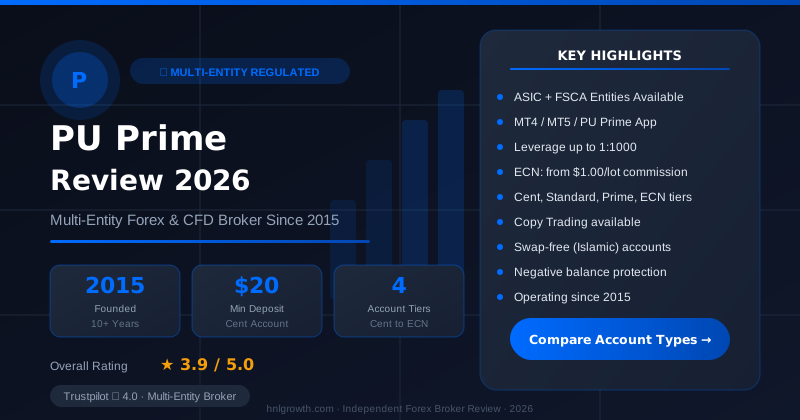
PU Prime — Multi-Entity Forex & CFD Broker
ASIC (AU) + FSCA (ZA) entities available · $20 min deposit (Cent) · MT4, MT5, PU Prime App · 4 account tiers
Most traders spend hours picking the right signal provider to copy—studying returns, analyzing drawdown charts, comparing win rates. That research matters. But many beginners overlook something just as important: the platform itself.
Even a well-performing signal provider can deliver disappointing results if the platform executes trades late, charges fees you didn't anticipate, or gives you no tools to cap losses when a rough patch arrives.
Two platforms can both offer copy trading and still feel completely different in practice. One might charge $30 monthly just for access, show only the best-performing traders, and give you no way to limit drawdowns. Another might charge nothing for access, display every trader's full history—including losing months—and let you configure an equity stop-loss before copying anyone.
The platform determines which traders you can follow, what instruments you can trade, and what risk controls you have at your disposal. Pick the wrong one and you'll face hidden costs, execution friction, or a support team that's hard to reach when you need help most.
What Separates a Trustworthy Platform from One You Should Avoid
Regulatory Status
A regulated platform operates under rules that protect your money. Check this before evaluating anything else.
Regulation means the broker must keep your funds in segregated accounts separate from its operating funds, maintain minimum capital reserves, and follow conduct rules set by the licensing authority. If something goes wrong, you have a defined legal path forward. Without regulation, you don't.
Important caveat: regulation governs operational compliance—client fund segregation, capital adequacy, conduct standards—but it does not guarantee execution quality, signal provider performance, or protection from trading losses. A regulated broker can still lose your money if your chosen signal providers make poor trading decisions.
The main regulators to look for include the Financial Services Authority of Seychelles (FSA), the Financial Services Commission of Mauritius (FSC), the Australian Securities and Investments Commission (ASIC), the Financial Sector Conduct Authority of South Africa (FSCA), and the Capital Market Authority of the UAE (CMA).
Always verify a license number directly on the regulator's official website. Do not rely solely on what a broker says about itself on its own homepage.
PU Prime's regulation page confirms it operates under multiple regulatory licenses and publishes full licensing details there. Verify any specific license number you rely on directly with the relevant regulator.
Signal Provider Pool—Size and Quality
The platform you choose determines which traders you can follow. Bigger isn't always better here—quality of data matters more than the number of traders listed.
What you want to see before copying anyone:
- At least 6–12 months of live trading history (not demo)
- Real drawdown figures, not just return percentages
- A profit factor that holds up over time, not just one good month
- Trade frequency and position sizes that match your risk tolerance
Some platforms curate their signal provider pool carefully, requiring minimum track records before a trader can accept followers. Others let anyone become a signal provider after a few weeks, leading to leaderboards crowded with short-lived hot streaks.
Red flag: If a platform won't show you full historical performance data before you deposit or subscribe, look elsewhere. Selective data is one of the most common warning signs of a platform built for signal providers who pay to be listed, not for followers who need transparency.
What we could not verify: PU Prime's official pages indicate that statistics are displayed for signal providers, but we cannot confirm the exact data refresh frequency, the minimum track record required before a provider is listed, or whether the figures are independently audited rather than self-reported. Review the data critically before copying anyone.
Performance Data Transparency
A trustworthy platform shows you the complete picture: monthly returns over 12 months or more, the worst drawdown the trader has experienced, how often they trade, and whether they've gone through extended losing patches.
Look for platforms that display:
- Return on investment (ROI) over multiple timeframes (1 month, 3 months, 6 months, 1 year)
- Maximum historical drawdown—the largest peak-to-trough decline
- Win rate and profit factor—not just winning percentage, but average win size versus average loss
- Number of current followers—a signal of trust, but also a potential capacity constraint
- Trade frequency—daily scalpers versus weekly swing traders require different monitoring commitments
Platforms that hide this data behind paywalls or show only top-performing periods are not built for your success.
Risk Management Tools
The platform should give you tools to limit how much you can lose—not just hope the trader you pick keeps winning.
A good copy trading platform provides these as standard features, not premium add-ons:
Equity stop-loss: Automatically pauses copying when your account balance drops to a threshold you set. This is your circuit breaker.
Copy ratio controls: Let you scale position sizes up or down relative to the signal provider. If a provider risks 5% per trade but you want to risk only 2%, adjusting the ratio lets you mirror their direction without matching their full exposure.
Per-trader allocation limits: Cap how much capital follows any single provider, preventing over-concentration.
Pause and stop functions: Give you the ability to halt new mirroring immediately without closing existing positions, or stop copying and exit all mirrored trades at once.
Without these tools, you rely entirely on manual monitoring. When a signal provider hits a significant drawdown, you have no automatic protection—only the discipline to check your account and intervene manually.
PU Prime states that equity stop-loss and copy ratio controls are available in the app. Confirm current availability and any account-tier or regional restrictions directly with the broker before relying on these features.
Fee Structure—Know What You're Actually Paying
Hidden fees eat into your returns. Know exactly what a platform charges before you put any money in.
Copy trading platforms can charge in several ways—and some charge multiple of these simultaneously:
- Spreads on executed trades—the difference between the buy and sell price
- Commissions per trade—a fixed fee per lot or per side
- Monthly subscription fees—common on third-party copy platforms ($20–$50/month)
- Management fees—a percentage of your account, charged regardless of performance
- Profit-sharing payments to signal providers—typically 20–50% of gains
According to PU Prime's published information, there is no monthly subscription fee for copy trading access. You pay the standard spreads and commissions of your chosen account type (Standard, Prime, or ECN), plus profit sharing with signal providers settled via the High Water Mark method—meaning you only share profits on genuine new gains, not on recovering previous losses.
PU Prime's spread and cost page carries the disclaimer that all listed values are for reference only and that current figures should be checked directly in MT4/MT5 or the PU Prime mobile app, as spreads vary by account tier, instrument, and market conditions. Confirm current fee terms with the broker before opening an account.
Asset and Instrument Diversity
More instruments mean more trading strategies you can access—and more ways to spread risk across markets.
A platform limited to forex pairs limits the signal providers you can follow and how you can diversify. Platforms offering forex, commodities, indices, metals, shares, ETFs, and bonds give you access to traders with different specializations who perform differently across market cycles.
According to PU Prime's published information, the broker offers a broad range of instrument categories including major and minor forex pairs, global indices, commodities, precious metals, individual shares, ETFs, bonds, and synthetic indices with extended trading hours on some products. The spread and costs page lists the full instrument menu.
Mobile App Quality
Much copy trading management happens on mobile. The app needs to be reliable and functional when you need to act quickly—especially if you want to stop copying or adjust allocations.
A good copy trading app lets you:
- Browse signal providers and review performance data
- Copy and stop copying efficiently
- Manage open positions and set stop-loss levels
- Handle deposits and withdrawals
- Receive notifications for significant account events
Before committing to any platform, read recent user reviews on the App Store or Google Play. Look specifically for comments on stability during active market hours and whether stop-copying functions are responsive.
PU Prime's copy trading feature operates through its iOS and Android mobile app. The trading app page describes how to set up and manage copy trading from within the app, without requiring separate desktop software installation. Confirm current feature availability before opening an account.
Customer Support and Education Resources
When something goes wrong—a deposit delays, verification hits a snag, a signal provider changes behavior—fast and knowledgeable support matters.
Look for platforms offering:
- 24/7 live chat—not just email ticketing
- Multi-language support if English isn't your first language
- Educational resources—guides, videos, and FAQs specific to copy trading
- Demo accounts—so you can test the platform and explore signal providers with virtual capital before risking real money
PU Prime's published information indicates 24/7 live support and the availability of demo accounts for practice.
Platform Comparison Table
The figures below are drawn from PU Prime's official pages as of the evidence pack used for this article. Spreads, minimums, and features can change; verify current terms directly with the broker before opening an account.
| Feature | What to Look For | PU Prime (per official pages) |
|---|---|---|
| Regulatory status | FSA, FSC, ASIC, FSCA, or CMA oversight | Multiple licenses—full details at puprime.com/regulation/ |
| Minimum deposit | $50–$100 for Standard accounts | $50 Standard; $20 Cent account |
| Minimum per signal provider | $25–$100 | $25 per signal provider |
| Monthly access fee | $0 preferred; avoid $20–$50 fees | $0 |
| Spreads | Variable by account tier and instrument | Reference values on spread page; check app for live figures |
| Commissions | Account-dependent | Standard: $0; Prime and ECN: commission-based (see spread page) |
| Profit sharing with providers | 20–50% of gains | Up to 50%, High Water Mark method |
| Platforms supported | MT4, MT5, web, mobile app | MT4, MT5, PU Prime mobile app |
| Instruments available | 100+ preferred; 500+ excellent | Multiple categories including forex, indices, commodities, metals, shares, ETFs, bonds |
| Equity stop-loss | Built-in, user-configurable | Stated as available in app—confirm current availability |
| Copy ratio adjustment | Yes, to scale position sizes | Stated as available—confirm current availability |
| Demo account | Virtual capital for practice | Available per official pages |
| Mobile app | iOS and Android | iOS and Android; copy trading app-based |
| Support availability | 24/7 live chat preferred | 24/7 live support per official pages |
Open a PU Prime account to compare account types or start with a demo before committing real capital.
Platform Setup Workflows: MT4, MT5, and Mobile
Different platforms offer copy trading through different terminals. Understanding the setup workflow helps you match a platform to your preferred trading environment.
MetaTrader 4 Copy Trading Workflow
MetaTrader 4 remains widely used for forex trading, though it does not natively support copy trading. Brokers that offer copy trading on MT4 typically do so through proprietary plugins or broker-side infrastructure layered on top of the terminal.
Typical setup:
- Download and install MT4 from the broker
- Log in with your live or demo account credentials
- Access copy trading through the broker's separate interface or plugin (not through MT4 itself)
- Browse available signal providers via the broker's web portal or app
- Allocate capital and enable copying
- Monitor positions in MT4 alongside any manually placed trades
Limitations: Risk controls like equity stop-loss may not be available natively within MT4 copy workflows. Position management for copied trades may need to happen outside the terminal.
MetaTrader 5 Copy Trading Workflow
MetaTrader 5 includes a built-in Signals functionality that lets you subscribe to signal providers directly through the terminal.
Setup steps:
- Download and install MT5 from the broker
- Log in with your account credentials
- Open the Signals tab in the Terminal window
- Browse signal providers by performance, drawdown, and subscription cost
- Subscribe to a signal (some are free; others charge a fee)
- MT5 mirrors trades while the terminal remains open and connected
Limitations: Your terminal must stay running and connected to the internet for trades to mirror. If your computer loses power or internet connection, copying pauses until reconnected. Signal provider data within MT5's built-in signals is self-reported; verify track records independently where possible.
Mobile App Copy Trading Workflow
Mobile-first copy trading platforms prioritize simplicity and accessibility for traders who manage positions on the go.
Setup steps:
- Download the broker's mobile app (iOS or Android)
- Register or log in with existing credentials
- Complete identity verification within the app—upload a government-issued ID and proof of address
- Fund your account via card, e-wallet, or bank transfer
- Navigate to the copy trading section
- Review signal provider profiles, set your copy ratio and equity stop-loss, then confirm copying
- Monitor open positions, pause copying, or stop and exit from the same app
Advantages: No desktop software required; push notifications for account events; one-tap position management.
Limitations: Smaller screens make detailed chart analysis less convenient. Some apps limit how many provider profiles you can review simultaneously.
PU Prime's copy trading operates entirely through the mobile app. MT4 and MT5 remain available for manual trading, but copy trading management—browsing providers, setting allocations, adjusting risk controls—happens in the app.
Choosing Signal Providers: Beyond the Leaderboard
Platform choice is half the decision. The other half is picking which traders to copy.
Most platforms rank signal providers by recent returns. That's a starting point, not a conclusion. A trader with a 50% return over three months may have achieved it through very high leverage or concentrated positions—an approach that can produce sharp drawdowns when market conditions shift.
Evaluation Framework
When reviewing a signal provider's profile, consider:
Track record length: At least 6–12 months of live trading history. Short track records cannot show how a provider handles drawdowns or changing market conditions.
Maximum drawdown: The largest peak-to-trough decline in their account. High historical drawdowns suggest you will experience similar drawdowns when copying them.
Profit factor: Total gains divided by total losses. A profit factor above 1.5 suggests the strategy wins more than it loses, accounting for the size of both wins and losses—not just the count.
Trade frequency: Daily scalpers require closer monitoring. Weekly swing traders give you more time to assess positions. Match trade frequency to the amount of monitoring you can realistically commit to.
Win rate in context: A high win rate can be misleading if average losses far exceed average wins. Focus on profit factor alongside win rate.
Follower count: A large number of followers can signal trust, but it can also create execution constraints if the provider's trade sizes are not scaling well with follower volume.
Strategy transparency: Does the provider explain their approach clearly? Are they trading a consistent instrument set? Have they materially changed their approach mid-track record?
Signal Provider Red Flags
Approach providers with extra caution if they:
- Have fewer than six months of live trading history
- Show maximum drawdowns above 40%
- Changed strategies abruptly without explanation (for example, switched from forex swing trading to short-term cryptocurrency positions)
- Primarily trade around news events, which tends to produce highly variable outcomes
- Show unusually strong returns but very few followers, which may indicate limited independent scrutiny of their data
- Make any claim resembling "guaranteed returns" or "risk-free" performance
No signal provider can guarantee returns. Past performance does not guarantee future results.
Diversification Rules
Never allocate more than 10–20% of your total capital to any single signal provider. Copying three to five providers with different strategies and instruments spreads risk across market conditions.
Avoid copying multiple providers who all trade the same instrument in the same direction. If all five providers are long EUR/USD and the euro weakens sharply, all five may post losses simultaneously—that is not diversification.
Real diversification means different instruments (forex, indices, commodities, metals) and different trading styles (position traders, swing traders, scalpers) with low performance correlation to one another.
Cost Structures Decoded: What You're Actually Paying
Understanding the full cost picture before you start prevents surprises later.
Spreads
The difference between the buy (ask) and sell (bid) price of an instrument. Spreads widen during high volatility or low liquidity—for example, during major news releases or overnight in thin markets. Your cost per trade increases accordingly.
PU Prime's spread page lists reference values by instrument and account type, and notes explicitly that all listed values are for reference only and that current values should be checked in MT4/MT5 or the PU Prime app, as they vary by account tier and market conditions.
Commissions
Some account types charge a fixed commission per lot traded. PU Prime's account structure includes a Standard account with no per-trade commission, and Prime and ECN tiers that charge commissions in exchange for tighter or raw spreads. Full current commission rates are on the spread and costs page.
Profit Sharing with Signal Providers
Most platforms split your profits with the signal provider. PU Prime uses the High Water Mark method, which means profit sharing is calculated only on net new gains above the previous high balance—not on recovering prior losses.
Worked illustration of the High Water Mark concept (using hypothetical figures for illustration only—not a projection of actual returns):
- Month 1: Account grows from $1,000 to $1,200 (+$200 gain). At 50% profit share, $100 goes to the provider. Net balance: $1,100.
- Month 2: Account drops to $1,050. No profit share applies because the balance is below the $1,100 high water mark.
- Month 3: Account rises to $1,250. New net gain above the high water mark is $150 ($1,250 − $1,100). At 50% profit share, $75 goes to the provider. Net balance: $1,175.
This structure protects you from paying twice on the same profits. Confirm current profit-sharing terms and rates directly with PU Prime before opening an account, as terms can change.
Subscription Fees
Some third-party copy trading platforms charge $20–$50 per month for access. PU Prime does not charge a monthly subscription fee for copy trading, according to its published information. Verify this applies to your account type and region.
Inactivity Fees
If an account is dormant for several months, some brokers charge an inactivity fee. Review the broker's fee schedule before leaving an account unused.
Currency Conversion
If you deposit in a currency different from your account denomination, conversion applies. Conversion fees vary by broker and payment method.
Trade Frequency and Net Costs
A practical consideration that does not require specific figures: high-frequency signal providers generate more spread and commission costs over a given period than low-frequency providers, regardless of account type. For smaller accounts, those costs represent a larger proportion of any gains. When evaluating a signal provider, factor their trade frequency into your overall cost assessment—not just their stated return percentage.
Account Opening and First Copy: Step-by-Step
According to PU Prime's account opening guide, the process typically takes around 10 to 15 minutes of active work, plus a waiting period for document verification. Steps may vary slightly by region or account type.
Step 1: Register
Provide your name, email address, phone number, and choose a password. Select your account currency (USD is most common) and the trading platform you prefer (MT4, MT5, or mobile app). This step typically takes a few minutes.
Step 2: Upload Identity Verification Documents
You need two documents:
- Government-issued ID: Passport, national ID card, or driving licence (valid, not expired, showing full name and date of birth)
- Proof of address: Utility bill, bank statement, or government letter dated within the last three months, showing your name and home address
Take clear photos with your phone. Ensure all four corners are visible, text is sharp, and there is no glare or shadow obscuring document details.
Step 3: Wait for Verification
Document review typically takes a few hours during business days, though it can take up to 24–48 hours. While you wait, you can open a demo account and practice navigating the copy trading interface with virtual capital.
Step 4: Fund Your Account
Deposit via credit card, debit card, bank transfer, or e-wallet (Skrill, Neteller, and other options depending on your region). Card deposits and e-wallets typically arrive quickly; bank transfers generally take 1–3 business days. Confirm current deposit options and processing times with the broker.
Minimum deposit on PU Prime: $50 for Standard accounts, $20 for Cent accounts, per published account information.
Step 5: Browse Signal Providers
Open the copy trading section of the app. Review signal provider profiles, focusing on ROI over 6–12 months, maximum drawdown, profit factor, trade frequency, and follower count. Sort by multiple criteria, not just recent returns.
Step 6: Set Your Copy Parameters
Before confirming, configure:
- Allocation amount: How much capital follows this provider ($25 minimum per provider)
- Copy ratio: 1:1 mirrors their position sizes exactly; a lower ratio reduces your proportional exposure
- Equity stop-loss: The balance level at which copying automatically pauses
These settings are your primary risk controls. Set them before copying begins.
Step 7: Start Copying
Confirm copying. The platform will now mirror every new trade the signal provider opens. Existing positions already open in the provider's account are generally not copied—only trades opened after you start following.
Step 8: Monitor Regularly
Review your account at least once per week. Check current drawdown from peak balance, the number and nature of open positions, trade frequency compared to historical norms, and any changes in strategy behavior.
If something deviates significantly from the provider's historical patterns, pause and assess before deciding whether to stop.
Managing Copied Positions: Pause, Stop, and Exit
Copy trading runs on autopilot, but regular oversight remains your responsibility.
Pause Without Closing
Pausing stops the platform from mirroring new trades while leaving existing positions open. Use this when:
- The signal provider's trade frequency or behavior changes suddenly
- You want to assess performance before committing additional capital
- You cannot monitor your account for a period and want to limit new exposure
Existing trades remain active and subject to market movement while paused.
Stop Copying and Close All Positions
Stopping exits all mirrored positions at current market prices. Use this when:
- The provider's drawdown has reached your pre-set tolerance threshold
- The provider's strategy has changed in ways you did not expect
- You want to reassess your provider selection from scratch
All positions close at the next available price, which may differ from displayed quotes during fast-moving markets.
Pre-Set Decision Rules
Establish clear intervention rules before you start copying—not in the middle of a drawdown. For example:
- Pause copying if trade frequency doubles from the provider's historical average
- Stop copying if the drawdown on your allocation exceeds a percentage you determined in advance
- Stop copying if the provider switches to instruments not reflected in their track record
Written rules remove emotional decision-making during stressful market conditions. Exiting at the bottom of a drawdown and missing a recovery is one of the most common behavioral errors in copy trading.
Execution and Performance Expectations
Copy trading mirrors someone else's risk-taking in real time—including their losses. It is not a passive income mechanism.
Realistic Return Expectations
Return ranges vary widely by signal provider, strategy, and market conditions. There is no "typical" return that applies to all providers. Past performance data on a provider's profile does not guarantee future results. Providers showing exceptionally high returns with unusually low drawdowns warrant extra scrutiny—verify their full trade history and methodology before copying.
Slippage
When a signal provider opens a trade, there is a delay before the same trade executes in your account. The length of this delay depends on platform infrastructure, your internet connection, and market conditions at the time. During fast-moving markets, the price can shift in that gap—meaning your entry price may differ from the provider's. Over many trades, execution differences can affect your net performance relative to the provider's stated figures.
What to Monitor Regularly
- Current drawdown from your peak balance on each provider
- Open positions and whether they appear correlated (for example, multiple long EUR positions across providers)
- Whether trade frequency matches the provider's historical average
- Any communication or signal from the provider about strategy changes
Risk Management for Followers
The best signal provider cannot compensate for poor risk management on your end.
Diversification Across Uncorrelated Strategies
Copy three to five signal providers who trade different instruments and use different strategies. If one provider encounters a losing period, others with different exposures may not be affected simultaneously.
Avoid copying multiple providers who all trade the same instrument in the same direction—that is not diversification, it is concentration under a different label.
Position Sizing
Never allocate more than 10–20% of your total capital to any single signal provider. This limits the impact of any single provider's drawdown on your overall account.
Drawdown Caps
Set an equity stop-loss for each provider. Decide in advance at what drawdown level you will stop copying automatically—before that situation arises.
Leverage Awareness
Some signal providers trade with high leverage. High leverage amplifies both gains and losses. If you are uncomfortable with a provider's leverage approach, reduce your copy ratio or choose a different provider. Understand that copied leverage applied to your account is real leverage affecting your real capital.
Behavioral Pitfalls
Two patterns account for a large share of poor copy trading outcomes:
- Chasing recent winners: Allocating to a provider after one strong month often means entering close to a performance peak. Assess full track records, not recent windows.
- Stopping during drawdowns: Exiting during a losing period locks in the loss and removes the possibility of recovery. If a drawdown is within the tolerance you set in advance, consider whether your rules, not your anxiety, should drive the decision.
Troubleshooting Common Issues
Platform Login Failures
- Confirm you are using the correct credentials (email and password, not MT4/MT5 account number)
- Clear browser cache or reinstall the app
- Verify internet connectivity
- Contact 24/7 support if the issue persists
Order Rejections on Copied Trades
Common causes include insufficient margin in your account, the instrument being unavailable in your region, or your account's position size limits being exceeded. Check your available balance and margin. If the issue recurs, contact support with details of the rejected order.
Delayed Trade Mirroring
If trades appear significantly after the provider's execution time, slippage on those trades increases. Check your internet connection and close background apps that may be competing for bandwidth. Contact support to confirm whether a server-side issue is contributing.
Signal Provider Goes Inactive
If a provider stops trading, their open positions remain in your account until closed. You can close positions manually, wait for the provider to resume, or stop copying and exit all positions at current market prices.
Support Escalation
When contacting support, provide your account number, a clear description of the issue, relevant screenshots, and the date and time the issue occurred. PU Prime offers 24/7 live support for account-related issues.
Who Should Choose Which Setup
Beginners with Smaller Budgets ($50–$500)
Prioritize: low minimum deposit, low minimum per provider, no monthly subscription fee, built-in risk controls, and a demo account for practice.
PU Prime's published account structure fits this profile—$50 minimum deposit for Standard accounts, $25 minimum per provider, no monthly subscription fee, risk controls in the app, and demo accounts available. Verify current minimums and features before opening.
Intermediate Traders ($500–$5,000)
Look for: access to multiple asset classes, transparent provider performance data covering 12 or more months, per-trade position controls, and responsive support. At this range, you can realistically diversify across five or more providers and test different strategies simultaneously.
Advanced Traders ($5,000+)
Prioritize: lower-cost account tiers (ECN or Prime) with raw spreads and commission-based pricing, access to providers with longer and more detailed track records, and robust risk management infrastructure. Monitoring at this level typically involves closer review of correlation across copied positions and more active management of allocation ratios.
Platform-Preference Traders
If you already use MetaTrader 4 or 5 for manual trading, choose a broker that integrates copy trading with the same terminal or offers a companion app that works alongside it. If you prefer managing everything from a mobile device, confirm that the broker's app handles all copy trading functions without requiring desktop software.
What We Could Not Verify
Execution quality by account tier: We cannot confirm whether execution speed, slippage rates, or order rejection rates differ between Standard, Prime, and ECN accounts without live testing over a statistically meaningful sample of trades. No first-hand testing data is available for this article.
Signal provider vetting rigor: Platforms indicate that performance data is displayed for providers, but specific vetting criteria and whether figures are independently audited versus self-reported are not publicly documented. Treat displayed statistics as a starting point for due diligence, not a guarantee of accuracy.
Follower capacity limits: Some providers may cap follower numbers to preserve execution quality. We cannot verify how or whether these caps are enforced.
Demo account execution parity: We cannot confirm whether demo account execution mirrors live account conditions in terms of spread, slippage, or order fills.
Feature availability by region or account tier: Risk control features described on PU Prime's platform pages may have regional restrictions or account-tier limitations. Confirm what applies to your specific account and jurisdiction before relying on any feature.
Tax and legal treatment: Copy trading gains may be subject to capital gains tax, income tax, or other obligations depending on your jurisdiction. This article is not tax or legal advice. Consult a qualified professional familiar with trading income rules in your country before trading.
Platform migration: Switching brokers while copy trading is active is not a standardized process. Closing positions, withdrawing funds, and re-establishing allocations on a new platform involves friction that varies by broker.
Frequently Asked Questions
What is the minimum amount to start copy trading on PU Prime?
The minimum deposit is $50 for a Standard account or $20 for a Cent account, per PU Prime's published account information. The minimum allocation per signal provider is $25. Verify current minimums directly with the broker, as these can change.
Is there an additional fee for copy trading beyond spreads and commissions?
PU Prime does not charge a monthly subscription fee for copy trading, per its published information. You pay standard spreads and commissions based on your account type, plus profit sharing with signal providers up to 50%, settled via the High Water Mark method. Confirm current fee terms before opening an account.
Can I test copy trading without risking real money?
PU Prime offers demo accounts with virtual capital. You can browse signal providers, allocate virtual funds, and practice the copy trading workflow before committing real capital. Confirm current demo account availability.
How quickly are copied trades executed?
Execution timing depends on platform infrastructure, your internet connection, and market conditions. There is always some delay between when a provider's trade executes and when it mirrors in your account. During fast-moving markets, this gap can result in a different entry price than the provider's—known as slippage. There is no industry-wide standard for mirroring speed, and figures vary by broker and market condition.
What happens to my copied positions if I pause or stop copying?
Pausing stops new trades from being mirrored but leaves existing positions open. Stopping closes all mirrored positions at current market prices. Confirm exact behavior with PU Prime before using either function, as implementation can differ.
Can I copy multiple signal providers at once?
Yes. Diversifying across three to five providers with different strategies and instruments is generally recommended to spread risk and reduce correlation.
Can I become a signal provider myself?
Many copy trading platforms allow you to become a signal provider once you meet minimum requirements, such as a minimum period of live trading history. You earn a share of profits generated by followers who copy you. Check PU Prime's terms for current provider eligibility requirements.
What are the main risks of copy trading?
Market risk (losses from adverse price movements), leverage risk (amplified losses from leveraged positions), drawdown risk (extended losing periods for a signal provider), slippage and execution differences, correlation risk (multiple providers losing simultaneously because they trade the same instruments), and the risk that past performance does not indicate future results.
Which platforms support MT4 and MT5 alongside copy trading?
PU Prime supports both MT4 and MT5 for manual trading, with copy trading managed through the PU Prime mobile app. MT4 and MT5 remain available for manual trade execution and analysis.
How do I switch brokers if I'm already copy trading elsewhere?
Close all copied positions on your current platform, withdraw your funds, open an account with the new broker, complete verification, re-fund, and re-establish your copy trading allocations. Position history and signal provider relationships do not transfer between brokers.
Summary
Choosing a copy trading platform requires evaluating regulatory standing, signal provider data quality, risk controls, cost structure, and how well the platform integrates with your preferred terminal or device. For traders comparing options in 2026, the key questions are: Is the broker licensed by a recognized authority? Can you see a full performance history before copying anyone? Does the platform give you tools to cap losses automatically? And what is the true all-in cost once spreads, commissions, and profit sharing are included?
This article has drawn on PU Prime's official pages for factual claims about its account structure, regulation, platforms, and copy trading features. Where we could not verify specific details—execution quality, feature parity across regions, provider data auditing—we have said so. Always confirm current terms directly with the broker.
Compare PU Prime account types and open a live or demo account to start exploring what suits your budget and trading approach.
Risk warning: CFDs and leveraged forex products are complex instruments and carry a high risk of losing money rapidly due to leverage. Consider whether you understand how these products work and whether you can afford to take the high risk of losing your capital. Check the entity, terms, and protections that apply in your jurisdiction before trading.
Ready to Compare PU Prime Account Types?
PU Prime is a multi-entity broker — ASIC (Australia) and FSCA (South Africa) regulated entities offer stronger oversight, while most international clients are onboarded to the FSA Seychelles or FSC Mauritius entities. Four account tiers (Cent, Standard, Prime, ECN) range from a $20 minimum deposit to full ECN pricing.
Risk disclaimer: PU Prime is a live, regulated multi-entity broker — trading forex and CFDs is done with real capital under normal market risk (this is not a simulated prop-firm evaluation). PU Prime operates under multiple separate licenses (ASIC, FSCA, FSA Seychelles, FSC Mauritius); which entity holds your account depends on your country of residence and determines your leverage cap and protections — confirm this before funding. CFDs and leveraged forex products are complex instruments and carry a high risk of losing money rapidly due to leverage; 62.2% of retail investor accounts lose money when trading CFDs with this provider. Consider whether you understand how CFDs/forex work and whether you can afford the high risk of losing your money. Affiliate disclosure: HNL Growth earns a commission when you open a PU Prime account through links on this page.