Best Forex Trading Apps 2026: A Platform and Feature Comparison
Mobile forex trading has evolved from a basic order-placement tool into a full execution environment. The right app depends on three decisions: platform preference (MT4, MT5, or proprietary),...
Reviewed using our forex & CFD broker review methodology
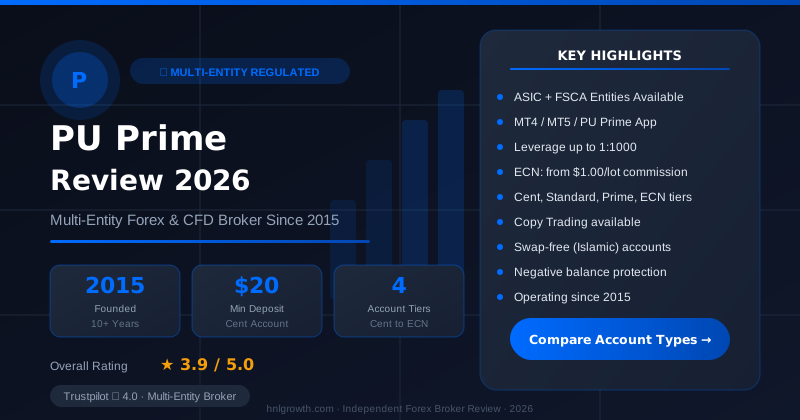
Checked on: 2026-08-17 | Broker terms, regulation, and pricing can change. Always verify at the official PU Prime site before opening an account.
Affiliate Disclosure: HNL Growth may earn a commission if you open an account through our links, at no additional cost to you. Risk Warning: CFDs and leveraged forex products are complex instruments and carry a high risk of losing money rapidly due to leverage. 62.2% of retail investor accounts lose money when trading CFDs with this provider. Trading forex and CFDs may not be suitable for all investors. Consider your objectives, experience, and risk appetite before trading, and ensure you understand the risks involved. Broker Disclosure: PU Prime is a live, regulated multi-entity broker (not a simulated prop-firm evaluation) — trades are executed with real capital in live market conditions, subject to normal market risk. Which PU Prime entity holds your account depends on your country of residence and determines your leverage cap and protections.
Last verified: August 2026 | Editorial Team
Best Forex Trading Apps 2026: A Platform and Feature Comparison
Mobile forex trading has evolved from a basic order-placement tool into a full execution environment. The right app depends on three decisions: platform preference (MT4, MT5, or proprietary), regulatory priority (which jurisdictions you accept), and cost structure (whether you prefer wider spreads with no commission or raw spreads with a per-lot fee). PU Prime's mobile offering suits traders prioritising MetaTrader cross-platform execution; its Standard account carries no commission while Prime and ECN accounts use a raw-spread-plus-commission model. Competitors such as IG are often cited for proprietary charting depth, Interactive Brokers for automation and API access, and eToro for copy trading. The decision hinges on workflow fit, regulatory comfort, and account-tier economics.
This guide compares six leading forex trading apps across platforms, costs, regulatory protections, and mobile-specific capabilities. It includes decision frameworks to help you map your trading style to the right broker-app combination, plus a setup walkthrough and feature parity checklist.
Disclosure: This page may contain affiliate links. We may earn a commission if you open an account through our links, at no extra cost to you. This does not affect our editorial assessment of any broker.
Quick Verdict: 6 Apps Compared
PU Prime — Multi-Entity Forex & CFD Broker
ASIC (AU) + FSCA (ZA) entities available · $20 min deposit (Cent) · MT4, MT5, PU Prime App · 4 account tiers
| Broker | Best For | Platforms | Regulation | Standout Feature | Min. Deposit |
|---|---|---|---|---|---|
| PU Prime | MT4/MT5 traders, competitive spreads | MT4, MT5, proprietary app | FSA Seychelles, FSC Mauritius, FSCA South Africa, CMA UAE | Raw-spread accounts (Prime/ECN); proprietary app | $50 (Standard); $20 (Cent) |
| IG | Proprietary charting depth | Proprietary app, MT4 | FCA, ASIC, multiple tier-1 | Advanced charting and drawing tools; broad asset coverage | Varies by region |
| Interactive Brokers | Automation, API access, global assets | IBKR Mobile, TWS, API | SEC, FCA, ASIC, multiple tier-1 | Tiered commission pricing; 135+ market centres | $0 (verify activity fee conditions with IBKR) |
| OANDA | Transparent pricing; US/Canada traders | fxTrade mobile, MT4 | FCA, ASIC, NFA, IIROC | No minimum deposit; fractional lot sizing | $0 |
| FP Markets | MT4/MT5 specialists, ECN execution | MT4, MT5, cTrader, IRESS | ASIC, CySEC | Tight ECN spreads; VPS hosting | $100 |
| eToro | Copy trading, social features | Proprietary app only | FCA, ASIC, CySEC | Copy top traders; commission-free stock trading | $50 (US); $100 (global) |
Important cost note: All spread figures in this article are indicative only and sourced from each broker's official pricing pages or publicly available sources. Spreads change continuously with market conditions. Verify current figures on each broker's live pricing tool before trading.
Decision Framework: Which App Fits Your Workflow?
Before comparing features and costs, answer three questions to narrow your options.
1. Platform Preference: MT4/MT5 or Proprietary?
Choose MT4/MT5 if:
- You use Expert Advisors (EAs) or automated strategies
- You want to migrate your setup (indicators, templates, watchlists) across brokers
- You prefer a familiar interface with a large library of custom indicators
- You trade primarily forex and CFDs
MT4 vs. MT5: MT4 remains widely used for forex-only trading and has the larger EA library. MT5 offers more timeframes (21 vs. 9), more advanced backtesting, an integrated economic calendar, and multi-asset support alongside forex and CFDs. PU Prime offers both; if starting fresh, MT5 is the more feature-complete choice.
Choose proprietary apps if:
- You prioritise integrated research tools (news feeds, analyst commentary, economic calendars)
- You want advanced charting without installing third-party software
- You trade across multiple asset classes in one interface
- You prefer a mobile UX designed specifically for touch screens
2. Regulatory Priority: Which Jurisdictions Are Acceptable?
Tier-1 regulators (FCA, ASIC, SEC, CFTC, NFA, IIROC):
- Higher capital requirements for brokers
- Client fund segregation and, in some cases, formal compensation schemes (for example, the UK's FSCS covers up to £85,000 per eligible claimant; the US SIPC covers eligible securities up to $500,000)
- Stricter leverage caps for retail clients (FCA caps retail forex at 30:1; NFA/CFTC caps major pairs at 50:1 — confirm current limits on official FCA, CFTC, and NFA websites respectively)
Available via: IG, Interactive Brokers, OANDA, FP Markets (ASIC entity)
Offshore/regional regulators (FSA Seychelles, FSC Mauritius, FSCA South Africa, CMA UAE):
- Capital requirements, enforcement mechanisms, and compensation schemes differ significantly from FCA/ASIC equivalents; there is no equivalent to the FSCS or ASIC's financial claims scheme
- Operational oversight, AML/KYC compliance, and client fund segregation are required
- Higher leverage options may be available depending on entity and instrument
- Fewer geographic restrictions for client onboarding
Available via: PU Prime (full regulatory details)
Your choice depends on your location, capital protection priorities, and leverage needs. Traders in the EU or UK typically have access to FCA- or CySEC-regulated entities with stronger consumer protections. If you are outside restricted jurisdictions and consider an offshore-regulated entity, understand clearly what protections are and are not available before trading. To verify that any broker holds current licences with a given regulator, check the official public registers of the relevant authority directly (for example, the FCA Financial Services Register, ASIC's professional registers, or the NFA's Background Affiliation Status Information Center).
3. Minimum Deposit and Account Tier Economics
Your deposit determines which account tier you can access, directly affecting trading costs.
Low minimum ($0–$100):
- PU Prime Standard: $50 minimum; indicative spread on EUR/USD approximately 1.3 pips; no commission
- PU Prime Cent: $20 minimum; balance displayed in cents for micro-lot practice
- eToro: $50–$100 minimum; spread built into pricing
- OANDA: $0 minimum; spread-based pricing
- Interactive Brokers: $0 minimum; commission-based pricing (a monthly activity fee may apply; verify the current fee schedule and threshold directly with Interactive Brokers before opening an account)
Mid-tier ($1,000):
- PU Prime Prime: $1,000 minimum; raw spreads with commission per lot
Higher tier ($10,000+):
- PU Prime ECN: $10,000 minimum; raw spreads with a lower per-lot commission rate
Illustrative cost structure note (indicative, not verified under live conditions): PU Prime's published pricing structure shows that the Prime and ECN accounts use a raw-spread-plus-commission model, while the Standard account uses a wider spread with no commission. Whether the all-in cost of a higher-tier account is lower for a given trader depends on that trader's volume, the actual fills received, and any slippage — none of which can be confirmed from a pricing page alone. Use PU Prime's spread and costs page to model your own scenario with current published figures.
All-In Cost Comparison: Indicative Figures for 1 Standard Lot EUR/USD
The table below uses indicative spread figures from each broker's official pricing pages or publicly available sources. These figures change continuously; verify current spreads before trading. Figures for IG, Interactive Brokers, OANDA, FP Markets, and eToro have not been independently audited; verify directly with each broker.
| Broker | Account Type | Indicative Spread | Commission (per side) | Notes |
|---|---|---|---|---|
| PU Prime | Standard | ~1.3 pips | $0 | No commission; spread-only; indicative |
| PU Prime | Prime | Raw (check live) | Per published schedule | See pricing page |
| PU Prime | ECN | Raw (check live) | Per published schedule | See pricing page |
| IG | Standard | Indicative only | $0 (forex CFD) | Verify on IG's pricing page |
| Interactive Brokers | Standard | Indicative only | Tiered; check IBKR | Verify on IBKR's pricing page |
| OANDA | Standard | Indicative only | $0 | Verify on OANDA's pricing page |
| FP Markets | Standard | ~1.0 pips | $0 | Indicative; verify with FP Markets |
| FP Markets | Raw | ~0.0 pips | ~$3/lot | Indicative; verify with FP Markets |
| eToro | Standard | ~1.0 pips | $0 | Indicative; verify with eToro |
Key takeaways:
- Raw-spread-plus-commission accounts (PU Prime Prime/ECN, FP Markets Raw) may offer lower all-in costs for traders executing high volume, but require larger minimum deposits.
- Spread-only accounts (Standard tiers, OANDA) are simpler to budget but carry wider indicative spreads.
- Spreads widen during low liquidity (overnight sessions, holidays) and around major news events; quoted figures reflect typical conditions only.
- The MT4 Standard account and MT5 Standard account at PU Prime offer the same platform features, with spreads as indicated above; confirm current figures on the pricing page.
Top 6 Broker Deep-Dives
PU Prime: MT4/MT5 Traders, Competitive Spreads
Platforms: MetaTrader 4, MetaTrader 5, PU Prime proprietary mobile app
Regulation: FSA Seychelles, FSC Mauritius, FSCA South Africa, CMA UAE. Full regulatory details.
Account types:
- Cent: $20 minimum; balance displayed in cents; suited to micro-lot practice
- Standard: $50 minimum; spread-based pricing; no commission
- Prime: $1,000 minimum; raw-spread-plus-commission model
- ECN: $10,000 minimum; raw-spread-plus-commission at a lower per-lot rate
For current spread and commission figures across all account types, check PU Prime's spread and costs page directly, as values are updated in real time. All published figures on that page are explicitly labelled as reference values; verify in the MT4/MT5 platform or the PU Prime mobile app for the most accurate current values.
Mobile strengths:
- Full MT4/MT5 functionality: 30 built-in indicators (MT4), 38 indicators (MT5), all standard order types
- PU Prime proprietary app covers account opening, funding, and withdrawal entirely in-app
- 24/7 customer support accessible via in-app chat
- MT4 supports automated trading via Expert Advisors; MT5 supports EAs with more advanced backtesting capability
A note on cross-device sync: MT4 and MT5 allow watchlists and templates to be carried across desktop, web, and mobile via the same account credentials, but the consistency of this sync varies by platform version and broker configuration. Test this on your own devices before relying on it for an active trading workflow.
Mobile limitations:
- EAs must be configured and run from desktop; mobile provides view access to EA activity but not configuration
- Advanced charting (multi-chart layouts, custom indicators) is more practical on desktop
- MT4 mobile does not include a built-in economic calendar; MT5 mobile does
Setup timeline: Registration takes around 10–15 minutes of active work. PU Prime states that document verification typically completes within a few hours during business days, but may extend to 24–48 hours depending on document quality and workload; actual timelines vary and are not independently verified. Card and e-wallet deposits are generally processed quickly; bank transfers typically take 1–3 business days per PU Prime's published guide.
Who should consider PU Prime:
- Traders comfortable with FSA Seychelles, FSC Mauritius, FSCA, or CMA UAE regulation
- Those prioritising MT4/MT5 familiarity and EA compatibility
- Active traders seeking raw-spread account options (subject to minimum deposit requirements)
- Traders outside tier-1 regulatory jurisdictions seeking higher available leverage (subject to entity and instrument; check the relevant entity's terms)
Who should look elsewhere:
- Traders requiring FCA or ASIC as their primary regulator
- Copy traders seeking integrated social trading (eToro is better suited)
- Traders who prioritise deep proprietary charting libraries
IG: Proprietary Charting Depth
Platforms: IG proprietary mobile app, MetaTrader 4 (limited to forex and some CFDs)
Regulation: FCA (UK), ASIC (Australia), plus entities in multiple additional jurisdictions
Mobile strengths:
- Extensive technical indicator library and pattern recognition tools
- Advanced order types including guaranteed stops (fee applies), trailing stops, and limit orders
- Integrated news and analyst commentary
- Broad asset coverage: forex, indices, shares, commodities, options, and bonds
Mobile limitations:
- Proprietary platform means no EA support or third-party indicator integration
- MT4 is available but covers a subset of instruments; the full IG feature set requires the proprietary app
- Spread-bet accounts (UK) carry wider spreads than CFD accounts
Who should consider IG:
- Traders prioritising tier-1 FCA/ASIC regulation
- Those who value deep charting tools and integrated research
- Multi-asset traders operating across forex, shares, options, and bonds
- UK traders interested in spread betting
Interactive Brokers: Automation, API Access, Global Assets
Platforms: IBKR Mobile, Trader Workstation (TWS), API access
Regulation: SEC (US), FCA (UK), ASIC (Australia), multiple tier-1 regulators
Mobile strengths:
- Commission-based pricing with tiered rates that reward higher volume
- Access to 135+ market centres, 150+ currencies, plus stocks, options, futures, and bonds in one account
- API access enables custom algorithm integration and automated execution
- Portfolio margin available for qualifying sophisticated traders
Mobile limitations:
- IBKR Mobile has a steeper learning curve; designed for active traders rather than beginners
- No MetaTrader support
- A monthly activity fee may apply unless a minimum commission threshold is generated; verify the current fee amount and qualifying threshold directly with Interactive Brokers before opening an account, as this is a material cost consideration for low-volume traders
Who should consider Interactive Brokers:
- High-volume traders who benefit from tiered commission pricing
- Algorithm developers needing API access
- Multi-asset traders managing equities, options, and futures alongside forex
- Those comfortable with the TWS interface
OANDA: Transparent Pricing, US/Canada Traders
Platforms: fxTrade mobile, MetaTrader 4
Regulation: FCA (UK), ASIC (Australia), NFA (US), IIROC (Canada)
Mobile strengths:
- No minimum deposit; fractional lot sizing down to very small units
- Transparent spread-based pricing with no hidden fees
- US and Canada entities regulated under strict NFA/IIROC oversight
- Trailing stops, time-in-force options, and other robust order types
Mobile limitations:
- fxTrade lacks the indicator library depth of MT4/MT5 or IG's proprietary platform
- The US NFA-regulated entity caps retail leverage at 50:1 on major pairs and 20:1 on minors, meaning effective buying power per dollar of margin is lower than under some other regulatory regimes
Who should consider OANDA:
- US or Canadian residents requiring NFA/IIROC regulation
- Beginners who want to start with very small position sizes
- Traders prioritising pricing transparency and no minimum deposit
FP Markets: MT4/MT5 Specialists, ECN Execution
Platforms: MetaTrader 4, MetaTrader 5, cTrader, IRESS
Regulation: ASIC (Australia), CySEC (Cyprus)
Mobile strengths:
- Four platform options including cTrader, which offers Level II pricing and depth of market on compatible account types
- Raw-spread account with a competitive per-lot commission
- VPS hosting available for EA and algorithm traders needing continuous uptime
- ASIC regulation
Mobile limitations:
- $100 minimum deposit limits accessibility compared with zero-minimum brokers
- cTrader mobile has a learning curve
- Smaller educational content library compared with IG or eToro
Who should consider FP Markets:
- Traders prioritising ASIC regulation with competitive ECN pricing
- cTrader users wanting Level II market depth on mobile
- EA and algorithm traders needing VPS hosting and low-latency execution
eToro: Copy Trading, Social Features
Platforms: eToro proprietary mobile app (no MT4/MT5)
Regulation: FCA (UK), ASIC (Australia), CySEC (Cyprus)
Mobile strengths:
- Copy top traders automatically; a minimum allocation per copied trader applies — check current terms on eToro's website
- Commission-free stock trading (spread applies on forex and CFDs)
- Social feed showing aggregated trader activity
- Beginner-friendly UI and simplified account opening
Mobile limitations:
- No MetaTrader or third-party platform integration
- Limited charting depth: basic indicators only
- Copy trading carries real risk: past performance of copied traders does not indicate future returns, and leverage on copied positions can amplify losses rapidly; the minimum allocation and leverage mechanics of copied positions should be reviewed in eToro's current terms before use
- A withdrawal fee per transaction applies; check the current fee amount and applicability by withdrawal method directly with eToro before withdrawing
Who should consider eToro:
- Beginners who want to observe or follow other traders while learning
- Those who value community-based insights
- Stock investors seeking commission-free equity trading alongside forex
- Those prioritising FCA/ASIC regulation with a simplified interface
Who should look elsewhere:
- Traders wanting advanced charting, EAs, or MT4/MT5
- Algorithm traders needing API access
- Frequent withdrawers for whom per-withdrawal fees are a material cost
Platform Primer: MT4 vs. MT5 vs. Proprietary Apps
MetaTrader 4 (MT4)
Strengths:
- Large library of EAs and custom indicators; supports .ex4 and .mq4 files
- Familiar interface with widespread tutorial and strategy coverage
- Stable and lightweight; performs well on a range of mobile devices
- 30 built-in technical indicators, 9 timeframes, 3 order execution types
Limitations:
- Forex and CFDs only; no stocks, futures, or options natively
- Fewer timeframes than MT5
- No integrated economic calendar on mobile
- Single-currency backtesting only
Best for: Forex-focused traders, EA users with MT4-dependent strategies, and those prioritising stability over new features.
MetaTrader 5 (MT5)
Strengths:
- 38 built-in indicators, 21 timeframes
- Multi-asset support: forex, stocks, futures, options (instrument availability is broker-dependent)
- Integrated economic calendar and news feed on mobile
- Advanced strategy tester supporting multi-currency and multi-timeframe backtesting
- Depth of market (DOM) display on ECN accounts
Limitations:
- Smaller EA library than MT4, though the gap is narrowing; MT4 EAs are not directly compatible with MT5 and must be converted or rewritten
- Slightly higher resource demand on older devices
- Some brokers still prioritise MT4 liquidity and infrastructure
Best for: Traders starting fresh, those needing multi-asset access or more timeframes, and those running complex backtesting strategies. Download MT5 from PU Prime.
Proprietary Apps (IG, eToro, Interactive Brokers)
Strengths:
- Designed for mobile-first UX: larger touch targets, swipe gestures, one-tap execution
- Integrated research (news, economic calendars, analyst commentary) without third-party plugins
- Multi-asset trading in one interface
- Streamlined account management: funding, withdrawal, and document upload in-app
Limitations:
- No EA support or algorithmic trading (Interactive Brokers' API is the exception)
- Limited custom indicator integration
- Platform lock-in: your setup cannot be migrated to another broker
- Charting depth varies significantly by broker
Best for: Beginners prioritising ease of use, multi-asset traders, and those who value integrated research over customisation.
Mobile vs. Desktop Feature Parity
Not all trading features work equally well on mobile. Feature availability can vary by broker, platform version, and device; confirm with your chosen broker before relying on any specific capability.
| Feature | MT4/MT5 Mobile | Proprietary Apps (IG, eToro, IBKR) | Desktop Advantage |
|---|---|---|---|
| Charting indicators | 30+ (MT4), 38+ (MT5) | Varies by broker | Custom indicators and multi-monitor layouts on desktop |
| Order types | Market, limit, stop, stop-limit | Varies by broker; IG offers guaranteed stops for a fee | OCO, fill-or-kill, and advanced order types available on some desktop platforms |
| Expert Advisors (EAs) | View EA activity on mobile; all configuration requires desktop | Not supported (except IBKR API) | Desktop required for EA setup, backtesting, and optimisation |
| Multi-chart layouts | Single chart at a time | Single chart at a time | Desktop supports simultaneous multi-chart layouts |
| Cross-device sync | Watchlists and templates accessible via account login (MT4/MT5); consistency varies by broker and platform version — test on your devices) | Varies by broker | More layout customisation on desktop |
| Economic calendar | MT5 built-in; MT4 requires third-party plugin | Usually built-in | Desktop calendars offer more filtering and alert customisation |
| Backtesting | Not available on mobile (MT4 or MT5) | Not available (except limited IBKR tools) | Desktop-only; MT5 supports multi-currency, multi-timeframe testing; MT4 supports single-currency testing |
| Depth of market (DOM) | MT5 ECN accounts | cTrader shows Level II on compatible accounts; others limited | Full order book and advanced DOM tools on desktop |
| One-tap execution | Supported | Supported | Desktop hotkey and click-to-trade execution |
| Biometric login | Fingerprint and Face ID | Fingerprint and Face ID | Desktop typically uses 2FA or hardware keys |
| Push notifications | Price alerts, margin calls | Price alerts, copied trader activity | Desktop alerts more customisable |
Key insight: Mobile apps handle the majority of typical trading tasks — chart analysis, order entry, position monitoring. Desktop remains essential for EA configuration, backtesting, multi-chart analysis, and certain advanced order types.
Setup Walkthrough: Opening a PU Prime Account on Mobile
Step 1: Register and Choose Account Type
- Visit PU Prime's account opening page on your mobile browser or download the PU Prime app.
- Enter your name, email address, phone number, and create a password.
- Choose your account currency (USD is most common).
- Select your platform: MT4, MT5, or the PU Prime app. If starting fresh, MT5 is the more feature-complete option.
- Choose your account type based on your deposit and trading volume: Cent ($20 minimum), Standard ($50 minimum), Prime ($1,000 minimum), or ECN ($10,000 minimum).
Time required: Around 3 minutes of active input.
Step 2: Upload KYC Documents
- Prepare a valid government-issued ID (passport, national ID card, or driver's licence).
- Prepare proof of address (utility bill, bank statement, or official government letter). PU Prime's account opening guide specifies that this document should be dated within the last 3 months and show your name and home address; confirm this requirement with PU Prime at the time of registration as requirements can change.
- Upload clear photos via the app or web portal. Ensure all four corners are visible, the text is sharp, and there is no glare.
Time required: Around 5 minutes.
Tip: Use your phone camera rather than a scanner. Good lighting and a flat surface improve image quality and reduce the chance of verification delays.
Step 3: Wait for Verification
PU Prime's compliance team reviews submitted documents. According to PU Prime's account opening guide, verification typically completes within a few hours during business days, but may take up to 24–48 hours depending on document quality and workload. These timelines are stated by PU Prime and are not independently verified; actual wait times vary. You can open a demo account in the meantime to explore the platform with virtual funds.
Step 4: Fund Your Account
Once verified, deposit your trading capital via the PU Prime app or client portal. Available deposit methods include credit/debit card, e-wallets such as Skrill and Neteller, and bank transfer. PU Prime's guide states that card and e-wallet deposits are generally processed quickly, while bank transfers typically take 1–3 business days. The minimum deposit is $20 for the Cent account and $50 for the Standard account. Confirm current fees and processing times in the app at the time of deposit, as these can change.
Step 5: Download the Platform and Place Your First Trade
- Download MT4 or MT5 from the App Store or Google Play, or use the PU Prime proprietary app.
- Log in using your account credentials and the server address provided by PU Prime during registration.
- Add an instrument to your watchlist, open a chart, and review price action.
- Set your stop-loss and take-profit levels before tapping "New Order."
- Select your lot size and confirm execution.
First-trade checklist:
- Start with a small position size to familiarise yourself with the platform
- Always set a stop-loss before entering a position
- Verify your account balance and available margin before placing an order
- Practice closing a trade so you understand the exit process
- Be aware that demo account execution typically fills orders at the quoted price; live trading involves real market conditions where slippage, partial fills, and order rejection can occur
Regulatory Context: What PU Prime's Licences Mean
PU Prime operates under multiple regulatory entities. To confirm that any licence is currently active, check the official public register of the relevant authority directly.
FSA Seychelles (Seychelles Financial Services Authority): regulates investment dealers and forex/CFD brokers operating in Seychelles. Requires operational audits, AML/KYC compliance, and client fund segregation. Capital requirements and enforcement standards differ from those of tier-1 regulators.
FSC Mauritius (Financial Services Commission): provides licensing for investment dealers and brokers in Mauritius. Oversight includes fund segregation and AML/KYC requirements.
FSCA South Africa (Financial Sector Conduct Authority): South Africa's primary financial market conduct regulator; imposes market conduct standards on licensed firms.
CMA UAE (Capital Markets Authority of the United Arab Emirates): regional regulator for investment services operating in the UAE.
What these licences require:
- AML and KYC compliance
- Client funds held separately from the broker's operating capital
- Regular financial reporting and operational audits
- Formal complaint and dispute resolution channels
What these licences do not provide:
- Compensation schemes equivalent to the UK's FSCS (£85,000 per eligible claimant) or equivalent investor protection funds under ASIC oversight
- Leverage caps equivalent to FCA retail forex limits (30:1) or NFA/CFTC caps (50:1 on major pairs)
- The enforcement powers that tier-1 regulators such as the FCA hold over UK-authorised firms
Geographic implications: PU Prime's regulatory structure allows it to serve clients in jurisdictions where some tier-1-only brokers face restrictions. Higher leverage may be available depending on entity and instrument. Traders in the EU, UK, US, and certain other regions should confirm the specific entity that would service their account and what local-law restrictions apply before registering.
Choosing your regulator: If tier-1 regulation (FCA, ASIC, NFA) and the associated compensation and enforcement protections are a priority, consider IG, Interactive Brokers, OANDA, or FP Markets' ASIC entity. If greater leverage flexibility and access under offshore-regulated terms better suit your situation, PU Prime's structure may be relevant — but the differences in capital protection, compensation rights, and enforcement are material and should be understood before trading.
Beginner Guidance: Demo Accounts, Learning Resources, Risk Controls
Demo Accounts
Most brokers offer demo accounts with virtual capital:
- PU Prime: Demo accounts available. Register here.
- IG, OANDA, FP Markets, eToro: Demo accounts with varying virtual balances and expiration policies (typically 30–90 days, often renewable; check each broker's current terms for details).
Important limitation: Demo environments typically fill orders at the quoted price with no slippage or requotes. Live trading involves real market conditions where slippage, partial fills, and order rejection can occur. Use a demo account to learn platform mechanics and order types, but do not use demo performance to form firm expectations about live execution quality or profitability.
Learning Resources
- PU Prime: Educational guides, webinars, and market analysis accessible via the website and app.
- IG: IG Academy covers technical analysis, risk management, and trading psychology.
- OANDA: Market analysis, economic calendar, and beginner tutorials.
- eToro: Copy trading and a social feed that lets you observe other traders' stated activity and reasoning.
Risk Controls
Key features to help manage risk on mobile:
- Stop-loss orders: Close a position automatically at a predefined loss level. Set one before entering every trade. Note that stop-loss orders do not protect against price gaps or slippage during major news events; execution at the exact stop price is not guaranteed in fast-moving markets.
- Take-profit orders: Lock in a gain when price reaches your target.
- Margin call alerts: Push notifications when account equity falls below required margin levels.
- Position size tools: MT5 and some proprietary apps include calculators that size positions based on a defined risk percentage.
- Negative balance protection: Certain FCA- and ASIC-regulated entities contractually prevent client balances from going below zero. This is not universally applicable across all brokers, entities, or account types. Confirm whether this protection applies to your specific entity and account type directly with the broker before relying on it.
What We Could Not Verify
The following claims cannot be assessed from official public sources alone:
- Actual execution speed and fill quality: Server-published latency figures cannot substitute for observation across real market conditions, including volatile periods such as major news releases.
- Slippage during news events: Official spread disclosures reflect typical conditions. Actual slippage during high-impact releases (NFP, FOMC, CPI) depends on each broker's liquidity providers and order routing at the moment of the event.
- Cross-device sync reliability: Whether PU Prime and other brokers consistently persist chart drawings, custom templates, and watchlists across mobile, web, and desktop requires multi-device testing per broker and per platform version. Test this yourself before relying on it.
- Customer support response quality: Stated 24/7 availability does not confirm actual resolution speed, channel reliability, or support quality under high-volume conditions.
- Withdrawal timelines in practice: Official pages list processing targets, but actual arrival times depend on payment method, account verification status, compliance checks, and broker workload.
- Mobile app performance on specific devices: Stability, battery usage, and feature availability on older iOS or Android versions require device-specific testing.
- Competitor spread figures and product counts: Figures for brokers other than PU Prime are drawn from publicly available sources but have not been independently audited. Verify directly with each broker.
- Interactive Brokers activity fee threshold: The current fee amount and the commission threshold above which the fee is waived should be confirmed directly with Interactive Brokers; this is a material cost consideration that could affect the effective minimum cost of holding an account at low trading volumes.
- eToro withdrawal fee: The fee amount and applicability by withdrawal method are not confirmed here; verify directly with eToro before withdrawing funds.
- PU Prime licence active status: Regulatory licences can be granted, varied, or withdrawn. Verify current active licence status on the official registries of the FSA Seychelles, FSC Mauritius, FSCA, and CMA UAE before trading.
Recommendation: Open a demo account with your top two or three broker candidates to test order entry, charting, alerts, and cross-device sync. Then fund a small live account to evaluate the withdrawal process and support responsiveness before committing significant capital.
Frequently Asked Questions
Can you trade forex on your phone with full desktop features?
Most features work on mobile, but some remain desktop-only. MT4/MT5 mobile apps support 30–38 built-in indicators, all standard order types, and watchlist management. You cannot configure or optimise Expert Advisors, run multi-chart layouts, or perform strategy backtesting on mobile; MT5 backtesting is considerably more powerful than MT4's single-currency testing, but both require desktop. Proprietary apps (IG, eToro, Interactive Brokers) offer mobile-optimised interfaces but do not support EAs. For most day-to-day tasks — chart analysis, order entry, position management — mobile is sufficient. For EA development, backtesting, and multi-monitor workflows, desktop is required.
Which app has the lowest spreads?
This depends on account tier, volume, and market conditions at the time of trading. PU Prime's ECN and Prime accounts use a raw-spread-plus-commission model that may offer lower all-in costs for higher-volume traders, while the Standard account carries a wider spread with no commission. Interactive Brokers uses a commission-based model that rewards high volume. Check current live spreads on each broker's pricing page before comparing, as indicative figures change continuously. Spreads widen during low-liquidity periods and around major news events regardless of broker.
How do I choose between MT4 and MT5?
Choose MT4 if you rely on specific EAs or custom indicators built for MT4 that have not been ported to MT5 (MT4 EAs require conversion to run on MT5). Choose MT5 if starting fresh: it offers 21 timeframes versus 9, more advanced multi-asset backtesting, an integrated economic calendar on mobile, and multi-asset support beyond forex and CFDs. PU Prime supports both; MT5 is the more forward-looking choice.
What security features protect mobile trading accounts?
- Two-factor authentication (2FA): SMS or authenticator app codes at login
- Biometric login: fingerprint or Face ID for quick, secure access
- Session timeouts: automatic logout after a period of inactivity
- Client fund segregation: trading capital held separately from the broker's operating funds
- Encrypted data transmission: SSL/TLS encryption protects data in transit
Enable 2FA and biometric login in your broker's mobile app. Avoid using public Wi-Fi without a VPN. Use a device passcode and enable remote wipe if your phone is lost.
How long does account funding take?
- Credit/debit card: typically instant (your card issuer may apply a foreign transaction fee)
- E-wallet (Skrill, Neteller): typically instant; a small processing fee may apply
- Bank transfer: typically 1–3 business days
- Cryptocurrency (where supported): timing varies depending on blockchain confirmation speed
Withdrawals generally involve additional compliance checks. PU Prime's official pages describe processing timeframes; actual bank arrival times depend on your payment method and your bank's processing schedule. Confirm current timelines in the client portal at the time of withdrawal, as these can change.
Are there geographic restrictions?
Yes. Each broker's regulatory structure determines which countries it can serve:
- PU Prime: Operates under FSA Seychelles, FSC Mauritius, FSCA South Africa, and CMA UAE. Geographic availability varies by entity; some jurisdictions are restricted. Check your eligibility on PU Prime's website.
- IG, OANDA, FP Markets: FCA and ASIC entities typically cannot serve US residents; US clients need a US-regulated entity.
- eToro: Availability varies by country; check eToro's website for your region.
- Interactive Brokers: Entity depends on your country of residence; leverage and protections vary by entity.
Verify your eligibility on your chosen broker's website before registering.
Risk Warning
Risk warning: CFDs and leveraged forex products are complex instruments and carry a high risk of losing money rapidly due to leverage. Consider whether you understand how these products work and whether you can afford to take the high risk of losing your capital. Check the entity, terms and protections that apply in your jurisdiction before trading.
Mobile convenience does not reduce the risks associated with leverage. A stop-loss order limits potential loss on a single position but does not protect against price gaps, slippage, or a sequence of losing trades. Only allocate capital you can afford to lose entirely.
Ready to explore mobile trading options? Open a PU Prime account to access MT4, MT5, and the proprietary mobile app. For current spread and commission figures across all account types, use PU Prime's spread and costs page.
Ready to Compare PU Prime Account Types?
PU Prime is a multi-entity broker — ASIC (Australia) and FSCA (South Africa) regulated entities offer stronger oversight, while most international clients are onboarded to the FSA Seychelles or FSC Mauritius entities. Four account tiers (Cent, Standard, Prime, ECN) range from a $20 minimum deposit to full ECN pricing.
Risk disclaimer: PU Prime is a live, regulated multi-entity broker — trading forex and CFDs is done with real capital under normal market risk (this is not a simulated prop-firm evaluation). PU Prime operates under multiple separate licenses (ASIC, FSCA, FSA Seychelles, FSC Mauritius); which entity holds your account depends on your country of residence and determines your leverage cap and protections — confirm this before funding. CFDs and leveraged forex products are complex instruments and carry a high risk of losing money rapidly due to leverage; 62.2% of retail investor accounts lose money when trading CFDs with this provider. Consider whether you understand how CFDs/forex work and whether you can afford the high risk of losing your money. Affiliate disclosure: HNL Growth earns a commission when you open a PU Prime account through links on this page.