Choosing a Forex Trading Platform in 2026: MT4, MT5, and Mobile Setup Compared
Choosing 'the best forex trading platform' isn't really one decision, it's two: which platform architecture (MT4, MT5, web terminal, or mobile app) fits how you trade, and which broker gives you...
Reviewed using our forex & CFD broker review methodology
Checked on: 2026-08-17 | Broker terms, regulation, and pricing can change. Always verify at the official PU Prime site before opening an account.
Affiliate Disclosure: HNL Growth may earn a commission if you open an account through our links, at no additional cost to you. Risk Warning: CFDs and leveraged forex products are complex instruments and carry a high risk of losing money rapidly due to leverage. 62.2% of retail investor accounts lose money when trading CFDs with this provider. Trading forex and CFDs may not be suitable for all investors. Consider your objectives, experience, and risk appetite before trading, and ensure you understand the risks involved. Broker Disclosure: PU Prime is a live, regulated multi-entity broker (not a simulated prop-firm evaluation) — trades are executed with real capital in live market conditions, subject to normal market risk. Which PU Prime entity holds your account depends on your country of residence and determines your leverage cap and protections.
Last verified: August 2026 | Editorial Team
Choosing a Forex Trading Platform in 2026: MT4, MT5, and Mobile Setup Compared
Choosing "the best forex trading platform" isn't really one decision, it's two: which platform architecture (MT4, MT5, web terminal, or mobile app) fits how you trade, and which broker gives you regulated access to that platform on terms you can verify. This guide separates the two, walks through PU Prime's platform ecosystem using official source data, and gives you a framework to test any broker-platform combination on demo before you fund a live account. No performance claims, no invented rankings, just what you can check yourself.
Disclosure: This page may contain affiliate links. We may earn a commission if you open an account through our links, at no extra cost to you.
Verdict in one table
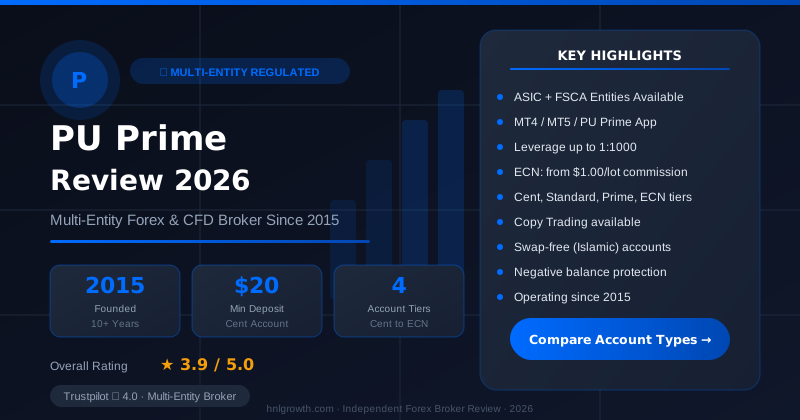
PU Prime — Multi-Entity Forex & CFD Broker
ASIC (AU) + FSCA (ZA) entities available · $20 min deposit (Cent) · MT4, MT5, PU Prime App · 4 account tiers
Before the detail, here's the shape of the decision. This isn't a ranking of "best" brokers, it's a map of which platform type suits which trading job.
| If your priority is... | Platform type that fits | Why |
|---|---|---|
| Deep charting, automation via Expert Advisors | MT4 or MT5 | Both support EAs, custom indicators, and strategy backtesting |
| Trading forex plus stocks, bonds, or synthetic indices from one terminal | MT5 | Broader instrument coverage and an extra strategy tester built for multi-asset use |
| Simplicity and a smaller learning curve | MT4 | Older, narrower feature set, widely documented |
| Trading away from a desk | Mobile app (PU Prime app or MetaTrader mobile) | Built for monitoring and order entry, not full chart analysis |
| No-install, browser access | MetaTrader WebTrader | Same account, no download required, generally fewer customization options than desktop |
Where PU Prime fits into this: it offers MT4, MT5, a proprietary mobile app, and MetaTrader WebTrader, and lets you pick MT4 or MT5 during account registration. That platform breadth covers most of the table above, but platform choice still doesn't remove the need to verify regulation and cost for your own jurisdiction, which is the next two sections.
Regulation and client protections side by side
"Regulated" is not a single standard. Protections differ sharply depending on which regulator authorizes the entity you actually open an account with, and that matters more than the platform you trade on.
PU Prime's regulation page lists oversight from the Financial Services Authority of Seychelles (FSA), the Financial Services Commission of Mauritius (FSC), the Financial Sector Conduct Authority of South Africa (FSCA), and the Capital Markets Authority of the UAE (CMA). The page does not list UK FCA authorization, so UK-specific protections tied to FCA status, such as Financial Services Compensation Scheme (FSCS) coverage up to £85,000 or the 1:30 retail leverage cap, do not automatically apply just because you're a UK resident opening an account with an offshore entity.
Which entity and regulator applies to your account depends on your country of residence at signup. PU Prime's own site notices state that the website is intended for individuals residing in jurisdictions where accessing it is legally permitted, and that PU Prime's entities are "neither established nor operating" in every visitor's home jurisdiction, with access provided on a reverse-solicitation basis under the laws of that visitor's home country. In practice, this means: PU Prime is not actively marketing into every jurisdiction, you are expected to be visiting on your own initiative, and the specific consumer protections available to you depend entirely on the regulator behind the entity you end up contracting with, not on where you happen to live. If you are unsure whether the site is intended to serve your jurisdiction, that is a question to resolve with PU Prime directly before funding an account, not something this guide can answer generically.
| What to check | Why it matters | Where to check it |
|---|---|---|
| Which legal entity you're contracting with | Determines which regulator, court, and compensation scheme (if any) applies | PU Prime account terms and the regulation page |
| Segregation of client funds | Affects whether your deposit is ring-fenced from company operating funds | Regulator's public register plus the broker's regulation page |
| Negative balance protection | Determines whether you can lose more than your deposit in fast-moving markets | Broker's terms; not guaranteed by every regulator |
| Compensation scheme eligibility | FSCS-style schemes generally apply only to FCA-authorized entities, not offshore ones | National regulator's official register |
| Leverage caps | Retail caps (e.g., 1:30) are jurisdiction-specific, not universal | Regulator rules for your country of residence |
If FCA-specific protections such as FSCS eligibility and the 1:30 retail leverage cap are a requirement for you, confirm directly with PU Prime which entity would service your account and what protections that specific entity offers, rather than assuming UK-standard protections apply.
All-in cost on the same trade
Spread is only one line item. Total cost = spread + commission (where applicable) + overnight swap + any deposit/withdrawal or conversion fees. PU Prime publishes account-type pricing on its spreads and costs page, with this explicit caveat: "All values listed are for reference only, please check MT4/MT5 or the PU Prime mobile app for the most accurate values." Treat every figure below, including the "from" spreads, as a published starting point or minimum rather than a live-tested or guaranteed number. Verify the actual figure in-platform before sizing a trade.
Here's what's confirmed from PU Prime's official account and cost pages:
| Account type | Min. deposit | Commission | Typical spread basis | Best suited for |
|---|---|---|---|---|
| Cent | $20 | None | Same spreads/execution as Standard, smaller position sizes | Testing strategies with minimal capital at risk |
| Standard | $50 | None | EUR/USD spreads from 1.3 pips | Traders who want simple, spread-only pricing |
| Prime | $1,000 | $3.50 per lot per side | Raw spreads from 0.0 pips | Frequent traders wanting tighter spreads |
| ECN | $10,000 | $1.50 per lot per side | Raw spreads from 0.0 pips | High-volume or professional traders |
Source: PU Prime account opening guide and spreads and costs page. Minimum deposit figures above reflect PU Prime's published amounts at the time this guide was written; confirm current figures on PU Prime's official pages before funding, since brokers can revise minimums without notice.
Worked example, day trading: ten round-turn trades on EUR/USD at 0.1 lots on a Standard account, using the published "from 1.3 pips" spread and no commission. For EUR/USD, the quote currency is USD, so pip value on a 0.1 lot (10,000 units) is approximately $1 per pip without needing a separate currency conversion for this step: 1.3 pips × $1 ≈ $1.30 per trade in spread cost, or roughly $13 across ten trades, before any slippage during volatile periods. On a Prime account, the same volume incurs a per-side commission of $3.50 × 0.1 lot = $0.35 per side ($0.70 round turn), so ten trades cost roughly $7 in commission alone, plus whatever the raw spread adds on top, since "from 0.0 pips" is a floor, not a guarantee. These are illustrative figures based on published minimums, not a guarantee of what you'll pay. If you want the total expressed in GBP or another currency, convert the final USD figure using the live exchange rate at the time you trade, that conversion only affects how the cost is displayed to you, not the underlying spread or commission calculation.
Worked example, swing trading: holding 1.0 lot of GBP/USD for a week adds overnight swap charges on top of the entry spread. PU Prime's cost page does not publish a fixed swap figure in the excerpt reviewed for this guide, and swap rates move with interest rate differentials over time. To estimate your own swap cost: open the live swap value for GBP/USD (shown in points or account-currency terms) directly in MT4, MT5, or the PU Prime app, then multiply that per-night figure by your lot size and the number of nights you plan to hold the position. Many MetaTrader brokers, PU Prime included by platform convention, apply a triple charge on one specific weekday to account for weekend settlement, so check which day that applies to before estimating a multi-night hold.
The methodology here is simple and repeatable: pull the live spread and swap for your instrument from your platform, multiply spread cost by your lot size, add commission if your account type charges one, add swap × nights held, and you have your total cost for that trade. Do this before every swing position, not just once.
Platforms and execution
MetaTrader 4. PU Prime's MT4 page confirms 30 free built-in indicators, support for thousands of custom indicators, and Expert Advisor (EA) automation via drag-and-drop in the Navigator panel. MT4 is available on desktop, PU Prime's mobile app, and MetaTrader WebTrader. It's the narrower of the two MetaTrader versions, no built-in economic calendar, fewer order types, and a smaller strategy tester, but it's also the more widely documented platform if you're following third-party tutorials or EAs built for MT4 specifically.
MetaTrader 5. PU Prime describes MT5 as its flagship platform, stating it is built for today's diverse markets and advanced strategies. Compared with MT4, PU Prime's own page states MT5 lets you trade across forex, shares, commodities, indices, and crypto from one terminal, adds extra order types for more precise entries and exits, includes an integrated news calendar, and features a more powerful multi-asset strategy tester. MT5 also supports EAs, installed via MetaEditor or the Experts folder. PU Prime's account-opening guidance suggests choosing MT5 if you're not sure, describing it as newer, faster, and offering more features, though MT4 remains fully supported and some traders prefer it for its simplicity or for EAs written specifically for MT4.
Mobile app and WebTrader. The PU Prime trading app page describes registration, funding, market monitoring, and order execution from a phone. Official pages describe monitoring and trading functionality but do not claim full feature parity with desktop MT4/MT5. As a general pattern across the retail trading industry, and not a verified statement about PU Prime's app specifically, mobile apps typically offer more limited chart annotation, multi-window layouts, and some order-management workflows than their desktop counterparts. If your workflow depends on deep multi-timeframe charting, treat mobile as a monitoring and adjustment tool, not your primary analysis surface, and confirm which features are actually available in the app yourself before relying on it.
| Platform | Charting depth | EA/automation | Order complexity | Mobile version | Setup |
|---|---|---|---|---|---|
| MT4 | Good (30+ indicators, custom .mq4/.ex4 support) | Yes | Standard | Yes (app + WebTrader) | Choose at registration, download, log in |
| MT5 | Stronger (more timeframes, integrated calendar) | Yes | Extended order types vs MT4 | Yes (app + WebTrader) | Choose at registration, download, log in |
| PU Prime app | Monitoring-focused | Not applicable | Standard execution | Native | Register, fund, log in |
| MetaTrader WebTrader | Reduced vs desktop | Limited | Standard | Browser-based | No download, log in with account credentials |
If MT5's broader instrument access and extra order types match how you want to trade, you can open a PU Prime account and select MT4 or MT5 during registration, then test the platform on a demo before funding it live.
Funding and withdrawal
PU Prime's account opening guide documents the process as: register (name, email, phone, password, choice of account currency and platform), upload a government-issued ID and a proof-of-address document dated within three months, wait for verification (PU Prime states this usually takes a few hours during business days), then fund the account. Deposit methods listed include credit/debit card, bank transfer, and e-wallets such as Skrill and Neteller. Card and e-wallet deposits are described as typically arriving instantly, while bank transfers are described as taking one to three business days. Minimum deposits are $20 for Cent, $50 for Standard, $1,000 for Prime, and $10,000 for ECN.
The official pages reviewed for this guide cover deposits in detail but don't include a dedicated withdrawal-timing policy page. What they don't specify, and what you should confirm directly before relying on it, are exact withdrawal processing timeframes in practice, any currency conversion charges if your funding currency differs from your account currency, and inactivity fee policy. Check PU Prime's account terms and conditions and, if needed, contact support directly for a written answer on withdrawal timing for your payment method, rather than assuming deposit speed and withdrawal speed match. Treat published funding speed as the stated policy, not a guarantee, since actual timing can vary by payment method and verification status.
Who should pick which
MT5 on a Standard account suits someone new to live trading who wants no commission, a low $50 minimum deposit, and access to a broader instrument set than MT4 offers, without committing to raw-spread pricing yet.
MT4 suits traders who already run MT4-specific EAs or custom indicators, or who prefer its narrower, more established feature set and don't need MT5's extra asset classes or order types.
Prime or ECN accounts suit frequent or high-volume traders for whom the spread-versus-commission math favors raw spreads plus a per-lot fee, but the $1,000 and $10,000 minimum deposits make these unsuitable for most beginners.
The Cent account suits anyone who wants to trade live conditions with real (if very small) money at risk while still learning position sizing and platform mechanics, before stepping up to Standard.
Mobile-only trading suits monitoring and quick adjustments, but is not well suited to traders whose strategy depends on multi-chart technical analysis, since mobile interfaces are generally more limited than desktop across the industry, a general pattern, not a confirmed statement about PU Prime's app specifically.
This isn't the right setup for everyone. If FCA authorization and FSCS-backed compensation are non-negotiable requirements for you, confirm with PU Prime which entity would hold your account and what protections that entity specifically provides, since the regulators listed on PU Prime's official page are FSA Seychelles, FSC Mauritius, FSCA South Africa, and CMA UAE, not the FCA. If you need guaranteed stop-loss orders or telephone dealing desk execution, verify those specific features are available for your account type before assuming they are.
Ready to test the platform fit for yourself rather than take a comparison table's word for it? You can compare PU Prime account types and open a demo first to check execution and charting against your own workflow before funding a live account.
What we could not verify
In the interest of accuracy, some things a setup-focused trader would want to know aren't available from the official pages reviewed for this guide, and we haven't run live tests ourselves:
- Live execution quality during high-volatility events (NFP releases, central bank announcements). Slippage and requote frequency during these windows depend on real-time liquidity and aren't disclosed on official pages. Test this yourself on a demo or with small live size before relying on execution speed for a news-trading strategy.
- Exact current swap rates for specific pairs. The cost page structure shows swap columns but published reference values change; pull the live figure from MT4, MT5, or the app before holding any position overnight.
- Withdrawal processing time in practice. No dedicated withdrawal-policy page was available in the sources reviewed. Stated deposit speed and real-world withdrawal timing can differ by payment method and verification status; confirm directly with support or your account terms once live.
- Mobile app feature parity with desktop, and demo account feature parity with live accounts. Official pages describe capability but don't provide a full feature-by-feature checklist against desktop MT4/MT5.
- Customer support responsiveness in practice, and platform uptime history. Neither is disclosed on official pages and would require ongoing, independent monitoring to assess.
What to verify yourself before funding a live account
- Identify which country's financial regulator applies to you based on your country of residence, then confirm which PU Prime entity would service your account using the regulation page and that regulator's own public register (most financial regulators publish a searchable licensee database on their official website).
- Open a demo account and check live spreads, order types, and charting tools for the pairs you actually trade.
- Calculate your own total-cost scenario (spread + commission + swap) for a typical trade using the live figures shown in-platform, not just published minimums.
- Test the mobile app's execution and monitoring workflow against your desktop setup to confirm it covers what you need on the go.
- Review the funding and withdrawal terms for your specific payment method directly in your account terms or with support, including any currency conversion cost.
FAQ
Is MT4 or MT5 better for beginners? Neither is objectively "better." MT5 offers more instruments, more order types, and an integrated news calendar, which PU Prime's own account-opening guidance suggests as a reason to default to it if unsure. MT4 has a narrower feature set but is widely documented, which can make it easier to follow beginner tutorials and third-party EAs built specifically for it.
Does PU Prime offer MetaTrader 4 or 5? Both. You select MT4 or MT5 when registering your account, and both are available on desktop, the PU Prime mobile app, and MetaTrader WebTrader, per PU Prime's MT4 and MT5 pages.
What is the minimum deposit to start? $20 for a Cent account and $50 for a Standard account, per PU Prime's account opening guide. Prime accounts require $1,000 and ECN accounts require $10,000. Confirm current figures directly with PU Prime, as published minimums can change.
Can I trade on mobile with the same features as desktop? Not necessarily. PU Prime's mobile app supports monitoring, funding, and order execution, but official materials don't claim full feature parity with desktop MT4/MT5. As a rough guide: monitoring and simple order adjustments generally translate fine to mobile, while multi-chart technical analysis, EA management, and complex order layering are the workflows most likely to feel constrained on a phone. Test both yourself if these matter to your strategy.
Is PU Prime FCA regulated? PU Prime's official regulation page lists authorization from the FSA (Seychelles), FSC (Mauritius), FSCA (South Africa), and CMA (UAE), not the UK FCA. If FCA-specific protections such as FSCS coverage matter to you, verify directly which entity would hold your account based on your country of residence.
How do I check if a broker is legitimately regulated? Look up the broker's license number on the relevant regulator's public register (not just the broker's own website), confirm the entity name matches exactly, and check whether client funds are held in segregated accounts. Treat marketing claims of legitimacy as a starting point, not proof.
Risk warning
Risk warning: CFDs and leveraged forex products are complex instruments and carry a high risk of losing money rapidly due to leverage. Consider whether you understand how these products work and whether you can afford to take the high risk of losing your capital. Check the entity, terms and protections that apply in your jurisdiction before trading.
Ready to Compare PU Prime Account Types?
PU Prime is a multi-entity broker — ASIC (Australia) and FSCA (South Africa) regulated entities offer stronger oversight, while most international clients are onboarded to the FSA Seychelles or FSC Mauritius entities. Four account tiers (Cent, Standard, Prime, ECN) range from a $20 minimum deposit to full ECN pricing.
Risk disclaimer: PU Prime is a live, regulated multi-entity broker — trading forex and CFDs is done with real capital under normal market risk (this is not a simulated prop-firm evaluation). PU Prime operates under multiple separate licenses (ASIC, FSCA, FSA Seychelles, FSC Mauritius); which entity holds your account depends on your country of residence and determines your leverage cap and protections — confirm this before funding. CFDs and leveraged forex products are complex instruments and carry a high risk of losing money rapidly due to leverage; 62.2% of retail investor accounts lose money when trading CFDs with this provider. Consider whether you understand how CFDs/forex work and whether you can afford the high risk of losing your money. Affiliate disclosure: HNL Growth earns a commission when you open a PU Prime account through links on this page.