Forex Trading Apps 2026: What Actually Matters on Mobile
A forex trading app is only as good as the broker behind it. Before evaluating any app's interface or charting tools, you need to confirm five verifiable things: the broker's regulatory status in...
Reviewed using our forex & CFD broker review methodology
Checked on: 2026-08-17 | Broker terms, regulation, and pricing can change. Always verify at the official PU Prime site before opening an account.
Affiliate Disclosure: HNL Growth may earn a commission if you open an account through our links, at no additional cost to you. Risk Warning: CFDs and leveraged forex products are complex instruments and carry a high risk of losing money rapidly due to leverage. 62.2% of retail investor accounts lose money when trading CFDs with this provider. Trading forex and CFDs may not be suitable for all investors. Consider your objectives, experience, and risk appetite before trading, and ensure you understand the risks involved. Broker Disclosure: PU Prime is a live, regulated multi-entity broker (not a simulated prop-firm evaluation) — trades are executed with real capital in live market conditions, subject to normal market risk. Which PU Prime entity holds your account depends on your country of residence and determines your leverage cap and protections.
Last verified: August 2026 | Editorial Team
Forex Trading Apps 2026: What Actually Matters on Mobile
A forex trading app is only as good as the broker behind it. Before evaluating any app's interface or charting tools, you need to confirm five verifiable things: the broker's regulatory status in your jurisdiction, the all-in cost for the pairs you plan to trade, whether mobile delivers the features your strategy requires, how quickly you can get your money out, and whether a demo account mirrors live conditions. PU Prime offers MT4 and MT5 on mobile alongside a proprietary trading app, and operates under multiple regulatory licences. This guide works through each decision point with verifiable data so you can evaluate any forex app, not just this one, before depositing real money.
Disclosure: This page may contain affiliate links. We may earn a commission if you open an account through our links, at no extra cost to you.
1. What you are actually choosing
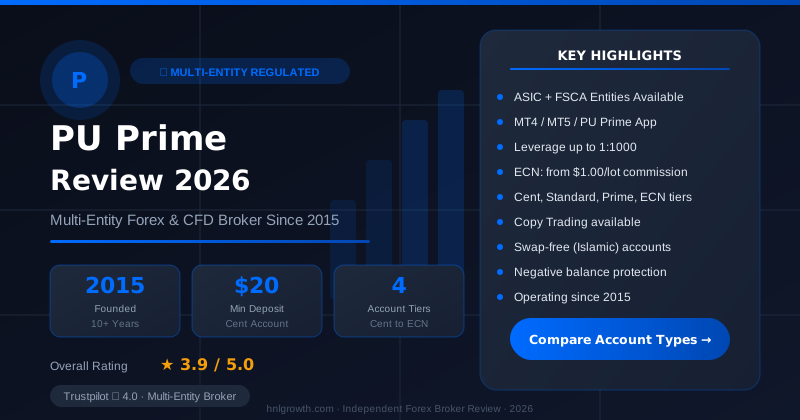
PU Prime — Multi-Entity Forex & CFD Broker
ASIC (AU) + FSCA (ZA) entities available · $20 min deposit (Cent) · MT4, MT5, PU Prime App · 4 account tiers
The phrase "forex app" covers three meaningfully different things, and beginners frequently conflate them:
Broker-native app: Built and maintained by the broker. Typically covers account management, deposits, withdrawals, and basic trading. May include copy trading or market news if those are native features.
MT4/MT5 mobile: MetaQuotes-built platforms distributed through App Store and Google Play. Require a broker account to connect. Offer the same order types as desktop MT4/MT5, but with one hard constraint: Expert Advisors do not run on mobile. This is a MetaQuotes architecture decision, not a broker limitation.
Third-party platforms (e.g., TradingView): Charting-first tools that connect to broker accounts via API or manual link. Feature-rich for analysis but may have limited order-entry integration depending on the broker.
Table 1 — App type comparison
| App type | Examples on PU Prime | Order types on mobile | EA / automation | Charting depth | Requires separate download |
|---|---|---|---|---|---|
| Broker-native | PU Prime Trading App | Market, limit, stop | Not supported | Basic to intermediate | No — access via App Store / Google Play |
| MT4 mobile | MetaTrader 4 (iOS/Android) | Market, limit, stop, stop-limit | Not supported (desktop only) | 30 built-in indicators | Yes — separate MetaQuotes app |
| MT5 mobile | MetaTrader 5 (iOS/Android) | Market, limit, stop, stop-limit, buy/sell stop limit | Not supported (desktop only) | Wider timeframes and indicators than MT4 | Yes — separate MetaQuotes app |
Note: Minimum iOS and Android version requirements for the proprietary app are not stated on the official trading app page as of publication. Check the App Store or Google Play listing for current device requirements.
2. The five things that actually matter
Each point below includes a verifiable test you can perform independently.
1. Regulation in your jurisdiction. PU Prime lists its regulatory entities on its regulation page: FSA (Seychelles), FSC (Mauritius), FSCA (South Africa), and CMA (UAE). Regulation is entity-specific — the entity that serves your country determines which protections apply to your account. How to verify: locate the licence number on the official page, then search it directly on the relevant regulator's public register. See Section 4 for a step-by-step walkthrough.
2. All-in cost. The spread displayed in marketing is rarely the only cost. Your actual cost per trade includes: spread + commission (if your account type charges one) + overnight rollover if you hold positions past the daily close. See Section 3 for a worked monthly scenario.
3. Mobile platform capability. The question is not whether an app exists, but whether it supports the specific order types and tools your strategy requires. Use the capability gap table in Section 5 to map your tasks.
4. Funding and withdrawal practicality. Official minimum deposits at PU Prime start at $20 (Cent account) and $50 (Standard account). Accepted methods include credit/debit card, bank wire, Skrill, Neteller, and other local payment options. Card and e-wallet deposits typically arrive instantly; bank transfers can take 1–3 business days per official account-opening guidance. Withdrawal processing times and any applicable fees: see Section 6.
5. Demo account. PU Prime confirms a demo account is available and can be started during the KYC waiting period. The demo uses real market prices, which means you can observe live spread behaviour across different sessions before committing funds. Use the London open (08:00–09:00 UTC) and during scheduled news events to see how spreads behave under pressure, not just in quiet markets.
3. All-in cost: what trading actually costs per month
The scenario below uses a beginner making 20 EUR/USD trades per month, each 1 mini-lot (0.1 standard lot = 10,000 units), held on average 1.5 days.
PU Prime's spread-and-costs page lists costs across three account types — Standard, Prime, and ECN — with a note that "all values listed are for reference only; check MT4/MT5 or the PU Prime mobile app for the most accurate values." The table below uses the account-type information confirmed from official sources. Specific pip values are illustrative mid-range estimates because spreads are variable and widen during low-liquidity periods.
Table 2 — Illustrative monthly cost scenario (EUR/USD, 1 mini-lot, 20 trades)
| Cost element | Basis | Est. cost per trade | Est. monthly cost (20 trades) |
|---|---|---|---|
| EUR/USD spread — Standard account | Spreads from 1.3 pips on Standard; 1 pip on 0.1 lot EUR/USD ≈ $1.00 | ~$1.30 | ~$26.00 |
| Commission — Standard account | No commission on Standard account | $0.00 | $0.00 |
| EUR/USD spread — ECN account | 0.0 pip raw spread + $1.50/lot/side commission on ECN account | ~$0.30 commission (2 sides) | ~$6.00 |
| Overnight rollover (1.5 days avg) | Swap rates not published in extracted source data — contact PU Prime or check platform for current rates | Contact broker | Contact broker |
| Withdrawal fee (1 per month) | Not confirmed in official fee schedule at time of writing — see Section 8 | Unconfirmed | Unconfirmed |
Reading this table: The Standard account's spread-only cost at 20 mini-lot trades is approximately $26/month before rollover — straightforward for budget planning. The ECN account's commission structure may reduce cost for traders doing higher volume, but the $10,000 minimum deposit makes it unsuitable for most beginners. The Prime account ($1,000 minimum, $3.50/lot/side commission, raw spread from 0.0 pips) sits between the two.
Important caveats: These figures use the Standard account's published "from" spread. Actual spreads are variable — they widen during news events, at the London/New York overlap close, and on Fridays approaching the weekly close. Observe spreads in a demo account during at least two news events before depositing. Rollover rates are not in the extracted official data; check the platform's swap tab or contact PU Prime directly for current rates.
4. Regulation and client protection
PU Prime lists four regulatory entities on its official regulation page. The entity that holds the account, not the brand name, determines which regulatory framework applies to you.
Table 3 — Regulatory entities and verification
| Regulatory body | Jurisdiction | Licence type | Compensation scheme | Coverage limit | How to verify |
|---|---|---|---|---|---|
| Financial Services Authority (FSA) | Seychelles | CFD broker / securities dealer | No statutory FSCS-equivalent scheme confirmed | Not confirmed | fsaseychelles.sc — search by entity name |
| Financial Services Commission (FSC) | Mauritius | Investment dealer | No statutory compensation scheme confirmed | Not confirmed | fscmauritius.org — public register |
| Financial Sector Conduct Authority (FSCA) | South Africa | Financial services provider | No statutory compensation scheme confirmed | Not confirmed | fsca.co.za — search FSP register |
| Capital Market Authority (CMA) | UAE | Broker / investment firm | No statutory compensation scheme confirmed | Not confirmed | cma.gov.ae — regulated entities list |
Regulatory verification walkthrough (use for any broker):
- Locate the licence number on the broker's official regulation page.
- Navigate directly to the regulator's official website (URLs above). Do not use search engine results — go directly to the .gov or official domain.
- Use the public register or "check a firm" tool to search by licence number or entity name.
- Confirm: entity name, licence status (active/inactive), licence type, and any conditions or restrictions.
- If the search returns no result or a different entity name, contact the regulator before depositing.
What regulation means in practice: Under regulated brokers, client money must be held in accounts segregated from the broker's own operating funds. This means that if the broker becomes insolvent, client funds held in segregated accounts are not available to creditors in the same way operational funds would be. The specific protections, segregation requirements, and any compensation scheme access vary by jurisdiction and are not uniform across the entities listed above. None of the regulators listed here operate a compensation scheme equivalent to the UK's FSCS (£85,000 per person per firm).
What it does not mean: Regulation does not guarantee against trading losses, does not guarantee withdrawal within a specific timeframe, and does not automatically extend protection to account holders in jurisdictions where the entity is not licensed to operate. Check which entity serves your country before opening an account.
Secondary CTA for readers whose primary concern is safety:
Verify PU Prime's regulatory status on the official regulation page
5. Platform and execution on mobile
The table below maps eight common trader tasks across the three mobile options available through PU Prime. "Full" means the feature is documented on the official platform page or is a standard MetaQuotes mobile feature. "Partial" means functionality exists but with documented limitations. "Desktop/web only" means the task cannot be completed on the mobile version.
Table 4 — Mobile capability gap audit
| Task | MT4 mobile | MT5 mobile | PU Prime proprietary app | Desktop/web only |
|---|---|---|---|---|
| Place market order | Full | Full | Full | — |
| Set pending order (limit/stop) | Full | Full | Full | — |
| Modify stop-loss from chart | Partial (manual input; chart-drag may be limited on small screens) | Partial (same constraint) | Not confirmed officially | Full on desktop |
| View account equity and margin | Full | Full | Full | — |
| Run Expert Advisor (EA) | Not supported — mobile only | Not supported — mobile only | Not applicable | Full on MT4/MT5 desktop |
| Access economic calendar | Not in MT4 mobile | Available in MT5 mobile | Not confirmed officially | Full on web platforms |
| Execute copy trade | Not applicable | Not applicable | Not confirmed officially | Confirm with PU Prime directly |
| Download trade history | Partial (view in-app; full export may require desktop) | Partial | Not confirmed officially | Full export on desktop/web |
The EA constraint explained: Expert Advisors are automated trading programs that run continuously within the MetaTrader client. Because they require constant local execution and a persistent connection, they only run on desktop MT4/MT5 installations. This is a MetaQuotes platform architecture constraint — it applies to every broker using MT4/MT5, not just PU Prime. If your strategy relies on automated EAs, you need a desktop machine (or a VPS running MT4/MT5) to run them. The mobile apps allow you to monitor EA-driven positions, but the EA itself must run elsewhere.
Mobile vs. desktop: honest answer. For placing and managing orders, reviewing positions, monitoring charts across multiple timeframes, and account management, mobile is genuinely capable for most beginner and intermediate use cases. The practical gaps are: (1) complex multi-chart analysis across more than two instruments simultaneously is harder on a 6-inch screen; (2) rapid position modification during fast markets is slower on a touchscreen than a keyboard shortcut; (3) EAs and advanced backtesting require desktop. If your workflow is primarily order entry, position monitoring, and chart review, mobile is sufficient. If it involves automation, multi-screen analysis, or rapid trade management during scheduled events, you want desktop or web as your primary environment.
6. Funding and withdrawal in practice
The following is sourced from PU Prime's account opening guide. Specific withdrawal fees and withdrawal processing timelines are not fully confirmed in the official source pack available at time of writing — see Section 8.
Table 5 — Funding summary (confirmed from official sources)
| Method | Minimum deposit | Processing time (deposit) | Processing time (withdrawal) | Fee |
|---|---|---|---|---|
| Credit/debit card | $20 (Cent) / $50 (Standard) | Typically instant | Not confirmed officially | Not confirmed officially |
| Bank wire | $20 (Cent) / $50 (Standard) | 1–3 business days | Not confirmed officially | Not confirmed officially |
| Skrill | $20 (Cent) / $50 (Standard) | Typically instant | Not confirmed officially | Not confirmed officially |
| Neteller | $20 (Cent) / $50 (Standard) | Typically instant | Not confirmed officially | Not confirmed officially |
| Other local payment methods | As per method | Varies | Not confirmed officially | Not confirmed officially |
What to verify before depositing: Ask PU Prime support directly for the current withdrawal processing times and any applicable fees for your preferred method. Review the official terms and conditions for withdrawal fee disclosures. Do not rely on community forum claims (positive or negative) as the basis for this decision.
Who should use which setup
Use the decision rubric below to identify the right combination of account type and platform for your situation.
Complete beginner (first live account): Start with a demo account on MT5 or the PU Prime app to observe real spread behaviour. When ready, the Cent account ($20 minimum) lets you trade with real money at very small position sizes — useful for getting comfortable with live execution without significant capital at risk. Use the proprietary app or MT5 mobile for order management. Desktop MT5 is worth installing within your first month for charting depth and trade history export.
Active scalper (short holding times, high trade frequency): The ECN account offers the tightest spreads (from 0.0 pips + $1.50/lot/side commission) but requires a $10,000 minimum deposit. The Prime account is the middle option ($1,000 minimum, $3.50/lot/side). MT5 mobile handles order entry and position management, but for high-frequency work during volatile sessions, desktop MT5 with a fast connection is the more reliable environment. Verify actual spread behaviour on your target pairs during the sessions you trade using a demo account first.
Swing trader (multi-day holds, overnight cost is material): The Standard account's no-commission, spread-only model keeps cost accounting straightforward. Overnight rollover (swap) costs are a meaningful part of your total cost at 1.5+ day average holds — obtain current swap rates from PU Prime directly or check the platform's swap tab before calculating expected monthly costs. MT4 or MT5 mobile is sufficient for monitoring and order modification during the day.
Copy trader: PU Prime's account opening guide confirms copy trading is available with a minimum of $25 per signal provider. Whether copy trading is managed through the proprietary app or requires a separate interface is not confirmed in the official source data available at time of writing — contact PU Prime or check the trading app page directly before assuming it is app-native.
Open a PU Prime demo account and verify spreads before depositing
Before you switch brokers: a practical checklist
If you are moving from an existing broker rather than opening a first account, these steps reduce friction and avoid gaps:
- Open positions: Close or plan your exit before switching. You cannot transfer open positions between brokers.
- Pending orders: Cancel all pending orders on the outgoing broker before closing the account.
- Trade history export: Download your full trade history in CSV or PDF format. Most platforms allow this from the account history tab. You may need this for tax purposes and your new broker cannot retrieve it from the old one.
- Tax records: Understand what your jurisdiction requires for reporting CFD gains and losses. Switching brokers mid-year creates two sets of records. Keep both.
- Overlapping period: Consider running both accounts simultaneously for 1–2 weeks while you verify the new platform's execution and withdrawal process before fully committing.
- KYC re-verification: You will go through KYC again at the new broker. Have documents ready and allow 24–48 hours for verification.
- Bonus or promotional terms: If you have an active bonus at the outgoing broker, check the terms — closing the account mid-promotion may forfeit both the bonus and any profits attributed to it under the terms.
What we could not verify
The following claims appear in marketing copy or community discussion but could not be confirmed against official documentation in the source pack available at time of writing. Verify these directly with PU Prime before making a deposit decision based on them:
- Withdrawal fees and processing times: No confirmed fee schedule or withdrawal timeline was available in the official source data. The "withdrawal without any additional charges" claim that appears in some marketing materials has not been confirmed against an official fee schedule. Ask PU Prime support and review the official terms before assuming zero withdrawal fees.
- Minimum iOS and Android version requirements for the proprietary app: Not stated on the official trading app page. Check the App Store or Google Play listing before assuming compatibility with your device.
- Copy trading interface: Whether copy trading is managed within the proprietary mobile app or requires a separate tool is not confirmed from official sources. Confirm with PU Prime directly.
- Overnight swap rates for EUR/USD and other standard pairs: Swap rates are not included in the extracted official spread-and-costs data. Check the platform's swap tab or contact PU Prime for current rates before modelling monthly costs.
FAQ
Can I run Expert Advisors on mobile? No. EAs run only on desktop MT4 or MT5 installations. This is a MetaQuotes platform constraint that applies to all brokers using these platforms, including PU Prime. On mobile, you can monitor positions opened by a desktop-running EA, but the EA itself must run on a desktop machine or a hosted VPS. If automation is central to your strategy, plan for a desktop setup.
What happens if the broker fails? Under most regulated brokers, client funds are required to be held in segregated accounts — separate from the broker's own operational funds. This means client money is not available to the broker's general creditors in an insolvency. The specific protections depend on the entity serving your account. None of the regulatory entities listed for PU Prime (FSA Seychelles, FSC Mauritius, FSCA South Africa, CMA UAE) operate a compensation scheme equivalent to the UK's FSCS. If compensation scheme coverage is a primary concern, verify which entity serves your jurisdiction and check that regulator's specific client protection framework.
How do I check a broker is regulated? Locate the licence number on the broker's official regulation page. Go directly to the relevant regulator's website (not a third-party search result). Use their public register to search by licence number or entity name. Confirm the licence is active, the entity name matches, and there are no material conditions or restrictions. Do this for the entity that will actually hold your account — not the parent brand.
Can I trade on mobile as effectively as desktop? For most beginner and intermediate use cases — placing and managing orders, monitoring charts, reviewing positions — yes. The practical exceptions are: running EAs (requires desktop), complex multi-instrument chart analysis (easier with larger screens and multiple monitors), and rapid position management during fast-moving events (keyboard shortcuts are faster than touchscreen). Use the capability gap table in Section 5 to check whether your specific required tasks are fully supported on mobile.
What is the minimum deposit? Per PU Prime's official account-opening guide: $20 for the Cent account, $50 for the Standard account, $1,000 for the Prime account, and $10,000 for the ECN account. Minimum deposit may also vary by payment method — check the official account types page for current figures.
How long do withdrawals take? Withdrawal processing times are not confirmed in the official documentation available at time of writing. Deposit processing is confirmed as typically instant for cards and e-wallets, and 1–3 business days for bank wire. For withdrawals, contact PU Prime support directly or review the official terms before opening an account if timeline is a material factor in your decision.
Risk warning
Risk warning: CFDs and leveraged forex products are complex instruments and carry a high risk of losing money rapidly due to leverage. Consider whether you understand how these products work and whether you can afford to take the high risk of losing your capital. Check the entity, terms and protections that apply in your jurisdiction before trading.
Ready to Compare PU Prime Account Types?
PU Prime is a multi-entity broker — ASIC (Australia) and FSCA (South Africa) regulated entities offer stronger oversight, while most international clients are onboarded to the FSA Seychelles or FSC Mauritius entities. Four account tiers (Cent, Standard, Prime, ECN) range from a $20 minimum deposit to full ECN pricing.
Risk disclaimer: PU Prime is a live, regulated multi-entity broker — trading forex and CFDs is done with real capital under normal market risk (this is not a simulated prop-firm evaluation). PU Prime operates under multiple separate licenses (ASIC, FSCA, FSA Seychelles, FSC Mauritius); which entity holds your account depends on your country of residence and determines your leverage cap and protections — confirm this before funding. CFDs and leveraged forex products are complex instruments and carry a high risk of losing money rapidly due to leverage; 62.2% of retail investor accounts lose money when trading CFDs with this provider. Consider whether you understand how CFDs/forex work and whether you can afford the high risk of losing your money. Affiliate disclosure: HNL Growth earns a commission when you open a PU Prime account through links on this page.