Vantage Trading App 2026: Features & Review
The Vantage App is a free iOS/Android app for CFD and copy trading, separate from the MetaTrader mobile apps. See what to check before you connect it.
Reviewed using our forex & CFD broker review methodology
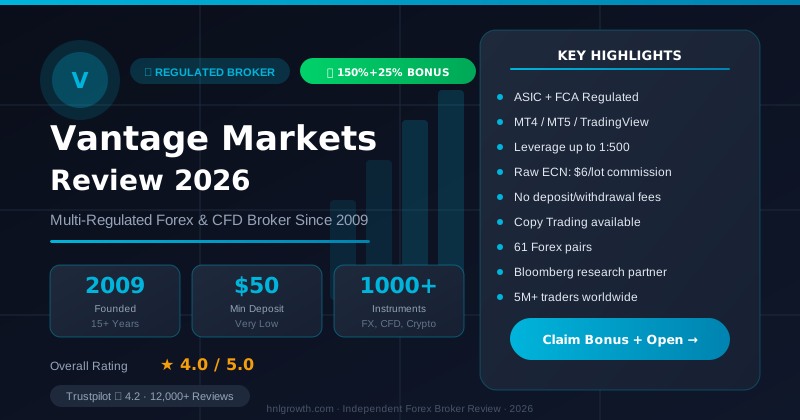
If you're searching for the Vantage trading app, you probably already trade CFDs or forex and want to know whether it's worth downloading, not how CFDs work. Short answer: the Vantage App is a free, standalone iOS/Android app for CFD and copy trading, separate from the MetaTrader 4/5 mobile apps Vantage also supports. Before you download and connect a live account, the things worth confirming are which Vantage entity your account sits under, what that means for protection, and whether the account types and costs match how you trade. This guide covers all three, then walks through download, login, and the feature set.
Disclosure: This page may contain affiliate links. We may earn a commission if you open an account through our links, at no extra cost to you.
Security considerations
Read this section before you fund anything, not after.
Entity and jurisdiction. Vantage operates through multiple legal entities. Which entity your account is opened under is not something you choose freely; it's typically determined by your country of residence at signup. This matters because protections differ sharply by jurisdiction. Vantage's official regulations page provides information for different jurisdictions, though the specific entity-to-region mapping and regulatory details can vary. Confirm the exact entity name and licence number stated on your own account documents during the signup process, and cross-check it against the regulator's public register for that jurisdiction.
Do not assume that because "Vantage is regulated," every account gets the same protection. An offshore licence generally involves lighter oversight and fewer investor-compensation guarantees than licences issued by stricter regulators. The entity holding your account determines your regulatory protections, not the app itself.
Fund segregation and negative balance protection. Whether client funds are held in segregated accounts, and whether negative balance protection is guaranteed or discretionary, depends on which entity holds your account. Check the specific client agreement tied to your entity before depositing.
Regulatory history. Some third-party broker review sites reference past regulatory actions involving Vantage entities. In 2024, Italy's CONSOB added certain Vantage-related domains to its investor warning list for operating without required authorization in Italy. In 2018, ASIC issued an enforceable undertaking relating to a Vantage entity regarding deficiencies in risk management systems. Rather than treat these as current or resolved facts without verification, the practical step is to check the public register of the relevant regulator (ASIC, FCA, CONSOB or VFSC, depending on the jurisdiction) directly for any active notices before opening or funding an account. Current regulatory standing can change, and historical actions don't necessarily reflect present compliance status, but knowing they occurred helps you ask the right questions during signup.
Phishing and cloned apps. Only download the Vantage App from the official App Store or Google Play listing by searching "Vantage" and verifying the developer name matches Vantage International Group Limited or the official entity. Only log in through links from vantagemarkets.com. Cloned trading apps and lookalike login pages are a known industry-wide fraud pattern; if you receive an unsolicited link asking you to install an app or "verify" your account, treat it as suspicious and go directly to the official site instead.
App overview
The Vantage App is Vantage Markets' proprietary mobile platform, distinct from MetaTrader 4 (MT4) and MetaTrader 5 (MT5) mobile, which Vantage also offers. According to Vantage's platform page, it gives clients access to over 1,000 CFD instruments across forex, gold, indices, ETFs, bonds and share CFDs, plus the ability to switch between live CFD trading and copy trading modes within the same app.
That matters for a broker-switcher because it means "the Vantage app" isn't one thing. If your current broker only offers MT4/MT5, moving to Vantage gives you a second option: a purpose-built app with copy trading and multi-currency management, alongside the more technical MT4/MT5 mobile clients.
The app is stated to be available "in supported regions" and where CFD trading is legally permitted. That's a meaningful caveat: availability and functionality can differ by country, and in some jurisdictions CFDs are restricted or unavailable to retail clients entirely. Before funding anything, verify during signup which entity is assigned to your account and cross-reference it against Vantage's regulations page.
Download and login
Getting started follows the basic pattern Vantage describes across its account and platform pages:
- Register. Open an account via Vantage's registration flow, choosing your account type (covered next). Vantage states this step takes about five minutes and can be completed from desktop or mobile, per its accounts page.
- Verify. Upload identity and address documents through the platform.
- Download the app. Install the Vantage App from the App Store (iOS) or Google Play (Android), or install MT4/MT5 if you prefer those platforms instead.
- Log in. Use your Vantage account credentials to sign in. If you already hold an MT4/MT5 account with Vantage, you can log into the corresponding MT4/MT5 mobile app with the same trading account number and password.
- Fund. Deposit before placing live trades; a demo account is available if you'd rather test the interface first.
If you're switching from another broker, note that you can't "import" an existing account from a different provider into the Vantage App. You'd be opening a new Vantage account and account number, even if you keep trading the same instruments.
Trading features and account types
Vantage offers several account types, and the app supports whichever account type you open, since it connects to the same trading account infrastructure as MT4/MT5. Based on Vantage's account comparison:
| Account type | Spreads | Commission | Who it suits |
|---|---|---|---|
| Standard STP | From 1.0 pips | Commission-free | Traders who want one simple, all-in cost with no separate commission line |
| Raw ECN | From 0.0 pips on majors | $3.00 per lot, per side ($6.00 round turn per standard lot) | Traders who want tighter spreads and are comfortable calculating commission separately |
| Pro ECN | From 0.0 pips | $1.50 per lot, per side ($10,000 minimum deposit) | Frequent or larger-volume traders |
According to Vantage's accounts FAQ, you can start with as little as $50 with Vantage, though the exact minimum can depend on account type and region. Confirm the current figure before funding.
UK FCA entity note: Pro ECN ($10,000 minimum, $1.50/lot/side) is offered through Vantage's global/offshore entities. Clients under the UK FCA entity get a different top-tier account instead — Premium ECN ($25,000 minimum, $0.75/lot/side) — so confirm which one applies to your entity.
Worked cost example: Trading one standard lot of EUR/USD on a Raw ECN account costs $6.00 round-turn commission plus whatever the live spread is at execution (spreads start from 0.0 pips on majors, though actual spreads move with market conditions). On a Standard STP account, that same trade has no separate commission, but the spread itself (from 1.0 pips) covers the broker's cost. Neither structure is inherently cheaper; it depends on your trade size and frequency, so compare both against your typical volume.
Inside the app, Vantage lists live CFD trading and copy trading as the two core modes, one-tap trading for faster order entry, multi-currency deposit and withdrawal management, and access to Signal Providers with visible past performance for copy trading. Vantage notes that past performance of Signal Providers is not indicative of future results, and copy trading carries its own risk.
A demo account with up to $100,000 in virtual funds is available for testing the app before committing real funds, and Vantage's FAQ states it can be reset if depleted.
Compare Vantage account types and open an account to connect Standard, Raw ECN or Pro ECN to the app based on the cost structure above.
Funding and withdrawal in app
The app is designed to let you deposit, withdraw and manage multiple currencies without leaving the platform, according to Vantage's app page. What isn't specified in Vantage's public platform pages is a full breakdown of every payment method's processing time, fees and restrictions by country, and that detail can also vary by which legal entity holds your account.
Verify these directly with Vantage support or your account's terms before you fund:
- Which deposit and withdrawal methods are offered for your country and entity
- Stated processing times for each method, and whether weekends or bank holidays affect them
- Any minimum withdrawal amount, and any fee tied to a specific method (card refunds, international wire fees and currency conversion charges are common)
- Whether withdrawals must return to the original deposit method, a standard anti-fraud control
Some users on independent review platforms report withdrawal delays or friction, and others describe smooth processing. Neither set of reports is independently verifiable, and review authenticity on any platform can't be confirmed. The authoritative source is Vantage's official terms and conditions and your account's client agreement, which you should read before your first deposit.
App vs MT4/MT5
The Vantage App and MT4/MT5 mobile serve different purposes, and it's worth knowing the gap before assuming the app replaces MetaTrader entirely.
| Feature | Vantage App | MT4/MT5 mobile |
|---|---|---|
| Copy trading with Signal Providers | Yes | No (native MT4/MT5 mobile doesn't include this) |
| One-tap trading | Yes | Standard order ticket flow |
| Expert Advisors (automated strategies) | Not applicable | Runs on desktop MT4/MT5; mobile can monitor but not host EAs |
| Advanced charting and custom indicators | Basic charting | More extensive, especially on MT5 |
| Multi-currency wallet management | Yes | Limited; primarily account-currency based |
| Familiar to traders coming from other MT4/MT5 brokers | Learning curve if new | Minimal, if you already use MetaTrader elsewhere |
If your trading depends on Expert Advisors, custom indicators or the broader MetaTrader ecosystem, MT4 or MT5 (desktop, with mobile as a companion) remains the better fit; see Vantage's MT5 page for setup. If you primarily want a simpler mobile-first experience with copy trading built in, the Vantage App is the more purpose-built option. Many traders use both: MT4/MT5 for active manual or automated trading, and the Vantage App for copy trading or quick order checks on the move.
Awards and recognition
In 2025 and 2026, Vantage Markets was recognised by ForexBrokers.com as 'Best-in-Class Social Copy Trading Platform,' based on ForexBrokers.com's annual broker review. The brand also received the 'Best Copy Trading Broker' award at the Professional Traders Award 2025. Award criteria and methodology are available on the respective award sites. Whether Vantage is the best copy trading app for you depends on your own needs and how the app's features align with your trading style and jurisdiction.
FAQ
Is the Vantage app safe and regulated?
The app itself is software; the regulatory protection comes from the legal entity your account is opened under, which varies by country. Confirm the entity and licence number on your account against the regulator's public register rather than relying on general "regulated broker" claims.
What's the minimum deposit for the Vantage app?
Vantage's FAQ states you can start with as little as $50, though the exact minimum can depend on account type and region. Confirm the current figure on the official accounts page before funding.
How do withdrawals work in the app?
You can request withdrawals from within the app. Specific processing times, fees and restrictions depend on the method and your account's entity, so verify these against your account's official terms rather than general reviews.
Does the Vantage app support copy trading and demo accounts?
Yes to both. The app lets you switch between live CFD trading and copy trading with visible Signal Provider history, and a demo account with up to $100,000 in virtual funds is available for practice before going live, per Vantage's platform page.
Can I trade multiple asset classes from one account?
Yes. According to Vantage's accounts page, you can access multiple asset classes via CFDs, including over 60 forex pairs, major indices, commodities like gold and oil, share CFDs, ETFs and cryptocurrencies, all from one account across MT4, MT5 or the Vantage App.
Summary
The Vantage App is a standalone mobile platform for CFD and copy trading, separate from MT4/MT5 mobile. It offers access to over 1,000 instruments, multi-currency wallet management, and copy trading with Signal Providers. Account types include Standard STP (commission-free, spreads from 1.0 pips), Raw ECN (spreads from 0.0 pips, $6 per lot round-turn commission), and Pro ECN for higher-volume traders. Minimum deposit starts at $50 depending on account type and region.
Before downloading, confirm which legal entity your account will be opened under, as protections differ by jurisdiction. Verify fund segregation terms, negative balance protection status, and withdrawal processing details in your specific client agreement. Check the regulator's public register for your entity to confirm licence status, and be aware of past regulatory actions involving Vantage entities, including CONSOB's 2024 warning and ASIC's 2018 enforceable undertaking, so you can ask informed questions during signup.
The app suits traders who want a mobile-first experience with copy trading. If you rely on Expert Advisors or advanced charting, MT4/MT5 remains the better fit. Many traders use both.
Open a Vantage account now to compare Standard and Raw ECN account types and download the app.
Editorial Verification Process
This article is fact-checked against Vantage's official documentation, following our 7-criteria broker review methodology. We have not completed a funded live-account test covering this specific feature — where a claim depends on live-account behavior, we cite Vantage's official terms and independently-reported user experience rather than presenting it as something we personally verified. See our broker review methodology for the full source hierarchy.
Risk warning: CFDs and leveraged forex products are complex and carry a high risk of losing money. Check the terms, entity and protections that apply to your jurisdiction before trading.
Related Vantage Markets Guides
Ready to Trade with Vantage Markets?
Vantage Markets is a multi-regulated forex & CFD broker (FCA, ASIC, FSCA, CIMA, VFSC, FSC) trusted by 5 million+ traders, with Raw ECN pricing from $3/lot, no deposit/withdrawal fees, and full MT4/MT5/TradingView support.
Risk disclaimer: Vantage Markets is a live, regulated broker — trading forex and CFDs is done with real capital under normal market risk (this is not a simulated prop-firm evaluation). CFDs and leveraged forex products are complex instruments and carry a high risk of losing money rapidly due to leverage; most retail investor accounts lose money trading these products. Consider whether you understand how CFDs/forex work and whether you can afford the high risk of losing your money. Affiliate disclosure: HNL Growth earns a commission when you open a Vantage Markets account through links on this page.