Vantage MT5 2026: Download & Account Guide
Vantage offers MT5 on all account types from a $50 minimum deposit, across desktop, mobile, and web. Here's setup, features, and entity choice.
Reviewed using our forex & CFD broker review methodology
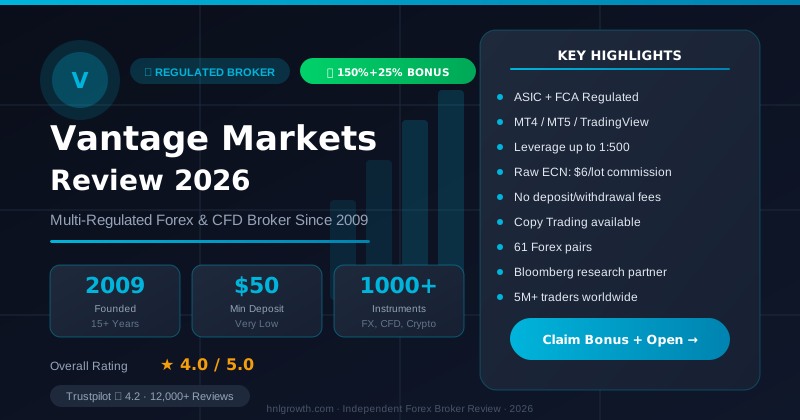
Vantage offers MetaTrader 5 across all account types—Standard STP, Raw ECN, and Pro ECN (or Premium ECN for clients under the UK FCA entity)—with minimum deposits starting at $50. MT5 is available on desktop (Windows, macOS, Linux), mobile (iOS and Android), and web terminal, accessible through official downloads from Vantage's platform page. Setup requires creating a Vantage account with the appropriate regulatory entity (ASIC Australia, FCA UK, or VFSC Vanuatu depending on your jurisdiction), downloading MT5, and connecting via Vantage-specific server credentials provided after account approval. The platform provides access to 1,000+ instruments including forex, indices, commodities, shares, ETFs, bonds and cryptocurrencies, all traded as CFDs, with native copy trading via MQL5 Signals, 21 timeframes, and 38 built-in technical indicators.
This guide walks you through MT5 availability verification, account selection, download and installation, server connection, execution costs, copy trading setup, and mobile access with Vantage.
Does Vantage Support MT5?
Yes. Vantage supports MetaTrader 5 across all account tiers with no platform-access restrictions based on deposit size. MT5 runs alongside Vantage's proprietary ProTrader platform and the older MT4, giving traders the choice based on feature preference rather than account type.
MT5 Account Eligibility
| Account Type | Minimum Deposit | MT5 Access | Spread Structure | Commission per Lot (per side) | Target User |
|---|---|---|---|---|---|
| Standard STP | $50 | Yes | From 1.0 pips | $0 (commission-free) | Beginners, small accounts, commission-averse traders |
| Raw ECN | $50 | Yes | From 0.0 pips | $3.00 | Active day traders, scalpers needing tight spreads |
| Pro ECN | $10,000 | Yes | From 0.0 pips | $1.50 | High-volume traders, professional money managers |
All three account types provide full MT5 functionality: Expert Advisors, copy trading via MQL5 Signals, all order types, and multi-asset CFD access. The difference lies in execution cost structure, not platform capabilities.
UK FCA entity note: Pro ECN ($10,000 minimum, $1.50/lot/side) is offered through Vantage's global/offshore entities. Clients registered under the UK FCA entity get a different top-tier account instead — Premium ECN, with a $25,000 minimum deposit and $0.75 per lot (per side) commission. Confirm which top-tier account applies to your entity before assuming Pro ECN's figures apply.
Regulatory Entity Availability
Vantage operates through three entities serving different jurisdictions:
- Vantage Global Prime Pty Ltd (ASIC, Australia) – AFSL 428901
- Vantage Global Prime LLP (FCA, UK) – FRN 590299
- Vantage Global Limited (VFSC, Vanuatu) – offshore, limited protection
MT5 is available through all three entities. Your jurisdiction determines which entity you'll register with and what fund protections apply.
Which Vantage Account Do You Need for MT5?
Your account choice should map to trading frequency, deposit capacity, and cost sensitivity rather than platform access—MT5 works on all tiers.
Decision Framework by Trader Profile
Copy Trader with $200–500 Budget
Standard STP makes sense if you're primarily following MQL5 Signals providers and trading infrequently. Commission-free execution keeps costs predictable when copying trades you didn't initiate. The 1.0+ pip spread is less competitive for high-frequency strategies but acceptable for swing trades and long-hold positions.
Active Day Trader with $1,000–5,000
Raw ECN suits traders opening 5+ positions daily on major forex pairs. The $3 commission per side ($6 round turn per standard lot) combined with spreads from 0.0 pips typically delivers lower all-in cost than Standard STP once you exceed 2–3 trades per day. Calculate your breakeven based on your expected trading frequency and the instruments you trade.
Algorithmic Trader with $10,000+
Pro ECN drops the commission to $1.50 per side while maintaining 0.0 pip spreads. The $10k minimum is steep, but if you're running EAs that execute 50+ lots per month, the $1.50 per-side reduction compounds quickly. Pro ECN also signals institutional-tier treatment to liquidity providers, potentially improving fill rates during volatile sessions.
Cost Comparison: Understanding Account Type Differences
| Account Type | Typical Spread Range | Commission Cost | Minimum Deposit | Best For |
|---|---|---|---|---|
| Standard STP | From 1.0 pips | $0 | $50 | Low-frequency traders, small accounts |
| Raw ECN | From 0.0 pips | $3.00 per side | $50 | Active day traders, scalpers |
| Pro ECN | From 0.0 pips | $1.50 per side | $10,000 | High-volume traders, money managers |
UK FCA entity clients: your top-tier account is Premium ECN ($25,000 minimum, $0.75/lot/side), not Pro ECN — see the UK FCA entity note above.
These figures reflect the account structures disclosed on Vantage's trading accounts page. Actual spreads vary based on liquidity, volatility, trading session, and instrument. Costs increase during news events, illiquid sessions, or when trading exotic pairs.
Disclosure: This page may contain affiliate links. We may earn a commission if you open an account through our links, at no extra cost to you.
Open a Vantage account to access MT5 across all account types with your chosen cost structure.
Download and Install Vantage MT5
Vantage hosts official MT5 downloads on its platform page. Third-party sites occasionally distribute outdated or modified versions—stick to the official source.
Desktop Installation (Windows, macOS, Linux)
- Visit the Vantage MT5 download page
- Select the package matching your operating system (Windows, macOS, or Linux)
- Open the downloaded file and accept the license agreement
- Follow the setup wizard—installation typically completes within minutes
- MT5 launches automatically once installed, or you can open it manually from your desktop
System Requirements (Desktop)
- Windows: Windows 7 or later, 512 MB RAM minimum (2 GB recommended), 500 MB free disk space
- macOS: macOS 10.10 or later, native M1/M2 support available
- Linux: Ubuntu 18.04+, Debian 9+, or equivalent with Wine compatibility layer
Mobile Installation (iOS and Android)
- Open the App Store (iOS) or Google Play Store (Android)
- Search for "MetaTrader 5" and install the official MetaQuotes app
- Launch the app and tap "Login to an existing account"
- Search for "Vantage Markets" or "Vantage International" in the broker list
- Enter your MT5 account credentials (provided after account approval)
Alternatively, download the Vantage App which combines account management and trading in one interface. The Vantage App uses a proprietary design rather than MetaQuotes' MT5 interface—both access the same execution infrastructure.
Web Terminal (No Installation)
Access MT5 WebTrader directly in your browser through Vantage's web trading page. No download required; you'll need an active internet connection and your MT5 login credentials. WebTrader supports all order types and charting tools but cannot run Expert Advisors due to browser sandboxing restrictions.
Create Your Vantage Account
MT5 requires a live or demo account before you can connect. Vantage's account opening form can be completed quickly, with verification approval times varying by entity and document clarity.
Account Opening Workflow
- Go to Vantage's registration page and hover over "Register" in the top-right corner
- Select "Trade Now" for a live account or "Practice Trading" for a demo account
- Complete the registration form with personal details, address, and employment information
- Choose your account type (Standard STP, Raw ECN, or Pro ECN) and base currency
- Submit verification documents: government-issued ID (passport, driver's license) and proof of address (utility bill, bank statement dated within 3 months)
- Await approval—verification processing times vary by entity and document quality
Entity Selection Matters
Your jurisdiction determines which Vantage entity regulates your account:
- Australia: ASIC entity (Vantage Global Prime Pty Ltd)
- United Kingdom: FCA entity (Vantage Global Prime LLP)
- Other jurisdictions: VFSC entity (Vantage Global Limited) by default, unless you qualify for ASIC or FCA
You cannot choose your regulatory entity arbitrarily—Vantage assigns the entity based on residency verification. This matters because fund protection, leverage limits, and dispute resolution mechanisms differ by regulator.
Demo Account Alternative
Vantage demo accounts provide up to $100,000 virtual capital for MT5 practice with live market pricing. Demo accounts require email registration but skip document verification. You can reset virtual funds if depleted. Demo accounts may expire after periods of inactivity but typically reactivate upon login.
Connect MT5 to Your Vantage Account
After account approval, Vantage emails your MT5 credentials: account number, password, and server name. These details differ from your Vantage client portal login.
Server Connection Steps (Desktop)
- Open MT5 on your computer
- Click "File" → "Open an Account" in the top menu
- Search for "Vantage International" or "Vantage Markets" and select your entity from the list
- Enter your MT5 account number (numeric ID, not email) and password
- Select the correct trading server from the dropdown—server names typically follow patterns indicating entity and account type
- Click "Finish"—if credentials match, live quotes appear immediately
Common Connection Errors
| Error Message | Cause | Resolution |
|---|---|---|
| "Invalid account" | Wrong account number or mismatched server | Double-check account number in welcome email; verify server matches your entity (ASIC/FCA/VFSC) |
| "Authorization failed" | Incorrect password or expired credentials | Reset password via client portal; demo accounts may expire after extended inactivity |
| "No connection" | Firewall blocking MT5, unstable internet | Allow MT5 through firewall on ports 443 and 3128; restart router |
| "Update available" | Outdated MT5 version | Update MT5 via Help → Check for Updates |
Mobile Connection (iOS/Android)
- Open the MetaTrader 5 app
- Tap "Settings" → "New Account" → "Login to an existing account"
- Search for "Vantage" in the broker search field
- Enter your account number and password
- Select the correct server—the app typically auto-populates available Vantage servers
- Tap "Sign In"
Mobile apps save credentials locally. To switch between demo and live accounts, tap the account name at the top of the app and select the alternate account from the saved list.
Regulatory Protection: Which Entity Covers You?
Fund safety depends on which Vantage entity holds your account. Not all regulators impose equivalent protections.
Protection Breakdown by Entity
| Entity | Regulator | License | Compensation Scheme | Segregation | Retail Leverage Cap | Negative Balance Protection | Dispute Resolution |
|---|---|---|---|---|---|---|---|
| Vantage Global Prime Pty Ltd | ASIC (Australia) | AFSL 428901 | AFCA dispute resolution (not compensation fund) | Mandatory | 30:1 major forex, 20:1 minor | Yes | AFCA ombudsman |
| Vantage Global Prime LLP | FCA (UK) | FRN 590299 | £85,000 FSCS | Mandatory | 30:1 major forex, 20:1 minor | Yes | FOS ombudsman |
| Vantage Global Limited | VFSC (Vanuatu) | License 700271 | None | Not mandated | Higher leverage available | Not mandated | VFSC complaints process |
What This Means Practically
ASIC (Australia): Tier-1 regulator requiring client fund segregation at regulated banks. The Australian Financial Complaints Authority (AFCA) resolves disputes but does not operate a compensation scheme equivalent to the UK's FSCS. AFCA can award up to specific limits depending on claim type, but this is a dispute resolution mechanism, not insurance against broker insolvency. If Vantage Australia defaults, segregated funds belong to clients, not creditors—but recovery depends on insolvency proceedings.
FCA (UK): Tier-1 regulator with statutory compensation protection. Client funds sit in segregated accounts and qualify for Financial Services Compensation Scheme (FSCS) coverage up to £85,000 per person if Vantage UK becomes insolvent. FCA also caps retail leverage at 30:1 for major forex pairs and mandates negative balance protection, eliminating the risk of owing more than your deposit.
VFSC (Vanuatu): Offshore regulator with minimal capital requirements and no compensation scheme. Segregation is not mandated, leverage limits differ from tier-1 jurisdictions, and negative balance protection is discretionary. VFSC oversight centers on license compliance rather than client fund auditing. Dispute resolution relies on Vantage's cooperation or civil litigation rather than ombudsman services.
Jurisdiction Assignment
You cannot "choose" FCA protection if you live in Asia or ASIC protection if you live in Europe. Vantage assigns your entity based on verified residency. If protection matters more than leverage, confirm which entity serves your jurisdiction before account opening.
MT5 Execution Costs on Vantage
Execution costs consist of spreads (the difference between bid and ask prices) and commissions (fixed per-lot charges on ECN accounts). Both vary by account type, asset class, and market conditions.
Spread and Commission Structure
| Account Type | Spread Model | Commission Structure | Cost Model |
|---|---|---|---|
| Standard STP | From 1.0 pips | None | Cost embedded in wider spread |
| Raw ECN | From 0.0 pips | $3.00 per side | Tight spread + commission |
| Pro ECN | From 0.0 pips | $1.50 per side | Tight spread + reduced commission |
UK FCA entity clients: your top-tier account is Premium ECN ($25,000 minimum, $0.75/lot/side), not Pro ECN — see the UK FCA entity note earlier in this guide.
Important Context
- Spreads fluctuate based on liquidity, volatility, and session. "From 0.0 pips" or "From 1.0 pips" represents the tightest observed spread under ideal conditions, not a constant guarantee.
- Expect spreads to widen during Asian session lows, major news releases (NFP, central bank announcements), and market opens/closes.
- Commission appears as a separate line item in your MT5 trade history. Standard STP embeds equivalent costs in wider spreads.
- One standard lot equals 100,000 units of base currency. Mini lots (0.1) and micro lots (0.01) scale commission proportionally.
Source: Vantage Trading Accounts page. Verify current spreads in the MT5 platform or client portal before trading, as market conditions change continuously.
Understanding All-In Costs
When comparing account types, calculate total cost per trade by adding spread cost and commission. For active traders, Raw ECN and Pro ECN typically offer lower all-in costs than Standard STP once you exceed 2–3 trades per day on major forex pairs. However, the higher minimum deposit ($10,000 for Pro ECN) requires sufficient capital to absorb normal trading drawdowns.
Copy Trading on Vantage MT5
MT5 includes native copy trading via the MQL5 Signals marketplace, which hosts thousands of signal providers. Vantage does not restrict access—any MT5 account can subscribe to signals.
MQL5 Signals Workflow
- Open MT5 and click the "Toolbox" panel at the bottom, then select the "Signals" tab
- Browse providers by performance metrics: return percentage, drawdown, trade frequency, subscriber count, and cost
- Select a provider and review their trade history, equity curve, and risk profile
- Click "Subscribe" and choose your subscription duration (monthly subscriptions vary by provider)
- Set your copying parameters:
- Volume multiplier: Scale signal provider's lot sizes to match your account size (0.1x = 10% of provider's volume)
- Maximum daily loss: Auto-stop copying if losses exceed a set percentage
- Stop loss/take profit sync: Mirror or override provider's risk parameters
- MT5 automatically replicates new signals in your account while you're logged in and connected to the internet
Subscription Costs
Signal provider fees add to your trading costs. Subscription fees vary by provider, and you also pay execution commissions (on ECN accounts) and spreads for each copied trade. A provider executing 20 trades per month on Raw ECN incurs commission costs ($3 per side × 2 × 20 trades = $120) before spreads and subscription fees. Compare these costs to your expected profit from the signal—historical performance does not guarantee future results, and slippage between provider fills and your replicated fills can erode returns.
Vantage-Specific Copy Tools
Vantage supports MT5's native MQL5 Signals infrastructure. The platform allows standard MQL5 Signals functionality across all account types. If you're considering Vantage primarily for copy trading, evaluate whether Raw ECN's tighter spreads and commission structure suit your typical signal provider's trade frequency compared to Standard STP's commission-free model with wider spreads.
Mobile MT5 Access
The MetaTrader 5 mobile app (iOS and Android) provides most desktop functionality but cannot run Expert Advisors due to mobile operating system restrictions.
Feature Parity: Desktop vs Mobile
| Feature | Desktop (Windows/Mac) | Mobile (iOS/Android) |
|---|---|---|
| Charting tools | Comprehensive set | Subset available |
| Technical indicators | 38 built-in | 30 built-in |
| Timeframes | 21 | 21 |
| Order types | All 6 pending types | All 6 pending types |
| Copy trading (MQL5 Signals) | Yes | Yes |
| Expert Advisors (EAs) | Yes | No |
| Price alerts | Yes | Yes |
| Multi-account dashboard | Yes | Yes |
| Economic calendar | Integrated | Integrated |
Mobile Use Cases
Mobile MT5 suits:
- Position monitoring when away from desktop
- Order modification (adjusting stop-loss/take-profit on existing trades)
- Quick market-order execution during brief opportunities
- Copy trading continuation (signals replicate as long as app runs in background)
Mobile MT5 does not suit:
- Algorithmic trading (no EA support)
- Advanced multi-indicator chart analysis (smaller screen limits simultaneous indicator display)
- Multi-chart strategies requiring 4+ synchronized timeframes
The Vantage App offers a streamlined alternative with simplified charting and account management in one interface, but uses Vantage's proprietary design rather than MetaQuotes' MT5 interface. Both apps connect to the same execution backend.
Vantage MT5 vs MT4: Which Should You Use?
Vantage supports both MT4 and MT5 on all account types. The platforms share core functionality but differ in timeframes, order types, and market coverage.
Feature Comparison
| Feature | MT4 | MT5 |
|---|---|---|
| Timeframes | 9 (M1, M5, M15, M30, H1, H4, D1, W1, MN) | 21 (adds M2, M3, M4, M6, M10, M12, M20, H2, H3, H6, H8, H12) |
| Pending order types | 4 (Buy/Sell Limit, Buy/Sell Stop) | 6 (adds Buy/Sell Stop Limit) |
| Built-in indicators | 30 | 38 |
| Graphical objects | 31 | 44 |
| Economic calendar | External link | Integrated |
| Strategy tester | Single-currency backtesting | Multi-currency, multi-threaded |
| Order execution modes | Instant, Request | Instant, Request, Market, Exchange |
| Market depth (Level II) | No | Yes |
| Partial close | No (close full position only) | Yes |
| Hedging | Yes | Yes |
| Copy trading | Limited third-party | Native MQL5 Signals |
Source: Vantage's MT5 guide and MetaQuotes specifications.
When to Use MT5
- You trade multiple asset classes (stocks, indices, commodities, crypto) and want consolidated access
- You use intermediate timeframes (M2, M6, H2, H3) for strategy precision
- You rely on copy trading via MQL5 Signals
- You test multi-currency EAs and need parallel backtesting threads
- You want integrated economic calendar alerts
When MT4 Remains Preferable
- Your existing EAs were written in MQL4 and require extensive rewrite for MQL5 compatibility
- You prefer MT4's simpler interface with fewer menu options
- Your broker (not Vantage) only offers MT4 for certain account tiers
For new Vantage users without legacy MT4 EAs, MT5 provides expanded capabilities beyond MT4. The learning curve is minimal—interface layouts share similarities, and most MT4 skills transfer directly.
ProTrader vs MT5: When to Use Each
Vantage's ProTrader platform offers web-based access with TradingView charts integrated directly into the trading interface. ProTrader provides browser-based trading without downloads.
ProTrader Differentiators
- TradingView charting engine with extensive indicators and Pine Script custom indicator support
- Browser-based—no installation required, works on various devices
- Unified account management and trading in one interface
MT5 Advantages Over ProTrader
- Expert Advisor (EA) support for algorithmic trading
- Native MQL5 Signals copy trading marketplace
- Established third-party EA and indicator ecosystem
- Desktop app runs locally without constant internet dependency
Practical Approach
Most traders use MT5 as their primary platform and access ProTrader's TradingView integration occasionally for specific chart analysis. Account minimums vary by platform and account type—confirm current requirements during account opening.
ProTrader does not replace MT5 for algorithmic traders or copy traders. It complements MT5 by adding TradingView's charting and social features, but lacks the execution automation that defines MT5's edge for systematic strategies.
Open a Demo Account
Vantage demo accounts let you test MT5 with virtual funds before committing capital. Demo accounts replicate live market pricing and execution conditions, minus the risk.
Demo Account Features
- Virtual capital available (adjustable during signup)
- Access to instruments available on live accounts
- Full MT5 functionality including EAs and copy trading
- Reset available if virtual funds deplete
- May expire after extended inactivity
What Demo Accounts Don't Replicate
- Emotional discipline under real loss—paper trading removes psychological pressure
- Slippage during high-impact news—demo fills may execute at quoted prices while live fills slip
- Withdrawal friction—demo accounts skip KYC verification and payment method testing
Demo accounts work best for:
- Learning MT5's interface, order types, and charting tools
- Testing EA logic and parameter optimization before live deployment
- Evaluating copy trading signal providers' replication accuracy
Demo accounts do not prepare you for:
- Risk management under real drawdowns
- Emotional response to consecutive losses
- Account funding and withdrawal workflows
Transition to a live account once you're comfortable with MT5's mechanics, not once you achieve consistent demo profits. Demo profitability does not predict live profitability—execution conditions differ subtly, and psychological factors only emerge when real capital is at risk.
MT5 Setup Support and Troubleshooting
Vantage provides support through live chat, email, and phone. Response times vary by entity and time zone.
Support Channels
- Live chat: Available 24/5 (Sunday 22:00 GMT – Friday 22:00 GMT)
- Email: support@vantagemarkets.com
- Phone: Entity-specific numbers listed on Vantage's contact page
Common MT5 Setup Issues
"Invalid account" error:
Verify your account number matches the server selected. ASIC, FCA, and VFSC accounts connect to different servers—selecting the wrong server triggers this error even if credentials are correct.
MT5 won't download market data:
Check firewall settings. MT5 requires outbound access on ports 443 and 3128. Windows Defender and corporate firewalls often block these by default. Add MT5 to your firewall's allowed applications list.
EA not executing trades:
Enable "AutoTrading" in MT5 (toolbar icon or Ctrl+E). Confirm your EA's trade parameters match your account size—many EAs require minimum account balances or specific lot size settings.
Copy trading signals not replicating:
MT5 must remain open and connected to the internet for signal copying to work. Mobile apps can run in background, but desktop MT5 must stay logged in. Check your VPS (Virtual Private Server) if you need 24/7 unattended copying.
What to Verify Yourself
Before committing capital, confirm:
Your regulatory entity: Check which Vantage entity serves your jurisdiction and what protections apply. Verify license numbers on ASIC's register, FCA's register, or VFSC's register.
Current execution costs: Log into a demo account and observe live spreads during your intended trading hours. Monitor spreads during both liquid and illiquid sessions to understand realistic costs.
MT5 server performance: Test platform connectivity from your location to Vantage's MT5 servers during peak trading hours. Connection quality can impact order execution during volatile moves.
Signal provider performance: Before subscribing to MQL5 Signals, review the provider's trade history over multiple months. Filter by maximum drawdown, not just return percentage—high returns with excessive drawdown signal risk levels that may not suit your tolerance.
Withdrawal process: Test a small withdrawal shortly after your first deposit to confirm payment method compatibility and processing times. Verify payment method requirements before accumulating significant profits.
Document requirements: Confirm what verification documents your entity requires before attempting to fund your account. UK and Australian entities enforce stricter KYC than offshore entities, potentially affecting approval timelines if documents are unclear.
Leverage limits: If trading from a restricted jurisdiction (UK, Australia, EU), confirm retail leverage caps apply to your account. Tier-1 regulators impose lower leverage limits than offshore jurisdictions.
Frequently Asked Questions
Can I use the same login for MT4 and MT5?
No. MT4 and MT5 require separate account numbers even when opened with the same broker. If you want both platforms, open two accounts through Vantage's client portal.
Does Vantage charge platform fees for MT5?
No. MT5 access is free on all account types. Costs consist of spreads, commissions (on ECN accounts), and overnight financing charges on leveraged positions held past 21:00 GMT.
Can I run multiple EAs simultaneously on one MT5 account?
Yes. Attach each EA to a separate chart instance. Monitor overall margin usage—multiple EAs opening positions simultaneously can exceed your account's free margin and trigger stop-outs.
What happens if my internet disconnects during a trade?
Stop-loss and take-profit orders already placed on Vantage's server execute regardless of your connection status. Market orders in-flight during disconnection may or may not fill—reconnect and check your open positions immediately.
Can I transfer funds between my MT4 and MT5 accounts?
Yes, via Vantage's client portal. Internal transfers between accounts under the same entity process during business hours. Transfers between entities (ASIC to FCA, for example) are not permitted—you must withdraw and re-deposit.
Do copy trading subscriptions auto-renew?
Yes. MQL5 Signals subscriptions renew monthly unless canceled. Cancel at least 24 hours before the renewal date to avoid charges.
Can I use MT5 on a VPS?
Yes. Many traders rent Windows VPS instances to run MT5 24/7 for EA execution and copy trading. MetaQuotes offers a native VPS service integrated with MT5, or use third-party providers. Vantage does not provide free VPS hosting.
MT5 provides multi-asset access, expanded timeframes, and native copy trading infrastructure across all Vantage account types. Your choice between Standard STP, Raw ECN, and Pro ECN depends on trading frequency, capital availability, and cost structure preference rather than platform limitations.
Compare Vantage account types to match your deposit capacity and execution cost requirements to the appropriate tier.
Related Vantage Resources
- Vantage Markets Review — full broker review covering regulation, fees, and platforms
- Vantage Account Types — compare Standard STP, Raw ECN, and Pro ECN in depth
- Vantage Spreads & Fees — full cost breakdown by account type and instrument
- Vantage Demo Account — test MT5 execution before committing real capital
- Vantage VPS — run MT5 24/7 for EA execution and copy trading
- Vantage TradingView Integration — advanced charting alongside MT5
Editorial Verification Process
This article is fact-checked against Vantage's official documentation, following our 7-criteria broker review methodology. We have not completed a funded live-account test covering this specific feature — where a claim depends on live-account behavior, we cite Vantage's official terms and independently-reported user experience rather than presenting it as something we personally verified. See our broker review methodology for the full source hierarchy.
Risk warning: CFDs and leveraged forex products are complex and carry a high risk of losing money. Check the terms, entity and protections that apply to your jurisdiction before trading.
Related Vantage Markets Guides
Ready to Trade with Vantage Markets?
Vantage Markets is a multi-regulated forex & CFD broker (FCA, ASIC, FSCA, CIMA, VFSC, FSC) trusted by 5 million+ traders, with Raw ECN pricing from $3/lot, no deposit/withdrawal fees, and full MT4/MT5/TradingView support.
Risk disclaimer: Vantage Markets is a live, regulated broker — trading forex and CFDs is done with real capital under normal market risk (this is not a simulated prop-firm evaluation). CFDs and leveraged forex products are complex instruments and carry a high risk of losing money rapidly due to leverage; most retail investor accounts lose money trading these products. Consider whether you understand how CFDs/forex work and whether you can afford the high risk of losing your money. Affiliate disclosure: HNL Growth earns a commission when you open a Vantage Markets account through links on this page.