Best MT4 Brokers in 2026
Best MT4 Brokers in 2026. An independent, fact-checked look at Vantage Markets for traders evaluating this broker.
Reviewed using our forex & CFD broker review methodology
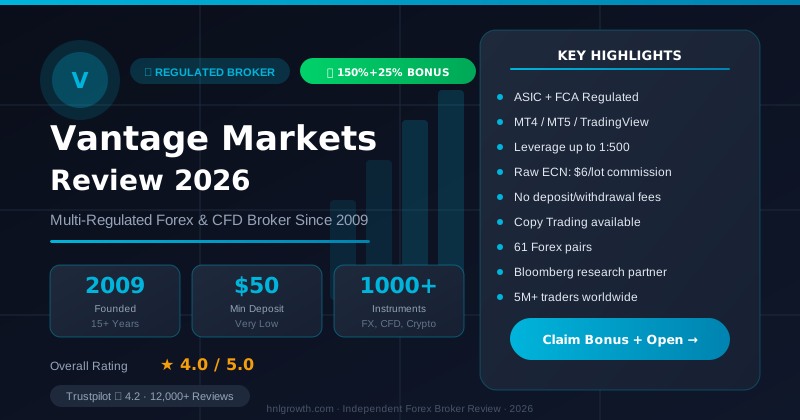
If you're searching for a broker for MetaTrader 4, the first thing worth knowing is that MT4 itself isn't a broker. It's a trading platform built by MetaQuotes back in 2005, and it only works once a regulated broker plugs it into live pricing and execution. So the real question isn't "where do I get MT4" but "which broker gives me MT4 with fair costs, reliable execution, and account protections I understand." This guide walks through what separates one MT4 broker from another, what to check before funding an account, and where Vantage's MT4 offering fits if you're comparing options.
Why MT4 Still Matters in 2026
MT4 has been around for over two decades, and newer platforms like MT5, cTrader, and TradingView-based terminals have closed a lot of the gap. It's still widely used because of a few things that haven't really been replaced:
- A charting and Expert Advisor (EA) ecosystem built over 20 years, with a huge library of free and paid indicators and automated strategies
- A simple, four-order-type structure (market and pending orders) that's easy to learn without being limited for most retail strategies
- Broad broker support: because MT4 is broker-agnostic middleware, most retail forex and CFD brokers integrate with it rather than only their own proprietary platform
It's also fair to flag where MT4 shows its age. It's built around MQL4, an older coding language than MT5's MQL5, and it was originally designed with forex trading in mind rather than as a true multi-asset terminal. If you want native support for netting and hedging position accounting side by side, deeper timeframes, or a broader built-in indicator set, MT5 (or a broker's newer web platform) may fit better. MT4 is not the right pick if you specifically need multi-leg options structures, exchange-listed futures, or advanced portfolio-margining features; those sit outside what any MT4 broker offers through the terminal.
Top MT4 Brokers to Shortlist
Because MT4 is offered by hundreds of brokers, "best" depends heavily on your entity, region, and what you actually trade. Names that commonly appear across independent third-party broker directories include IC Markets, Pepperstone, FP Markets, Exness, Tickmill, FxPro, AvaTrade, and Vantage, among others. Rather than repeating marketing claims about any of them, treat a shortlist like this as a starting point and verify current spreads, minimum deposits, and regulatory status directly on each broker's own site before deciding, since these details change and can differ by country of residence.
| Broker | Regulated entities (examples) | Account types on MT4 | EA/VPS support | Notable for |
|---|---|---|---|---|
| Vantage Markets | FCA (UK), ASIC (Australia), FSCA, others | Standard STP, RAW ECN, Pro ECN (entity-dependent) | MQL4 EA support confirmed; VPS terms not detailed in sources reviewed — confirm directly | Multi-asset MT4 (forex, indices, shares, commodities, ETFs, bonds) |
| Pepperstone | FCA, ASIC | Standard, Razor (raw + commission) | EA support standard; VPS commonly offered — not independently verified | Raw-spread Razor account frequently cited by active MT4 traders |
| IC Markets | ASIC, CySEC, FSA (Seychelles) | Standard, Raw Spread | EA support standard; VPS commonly offered — not independently verified | Raw ECN pricing frequently cited for high-frequency/algo trading |
| FP Markets | ASIC, CySEC | Standard, Raw | EA support standard; VPS commonly offered — not independently verified | Raw pricing tier similar to IC Markets/Pepperstone |
| Exness | FSA (Seychelles), CySEC | Standard, Raw Spread, Zero, Pro | EA support standard; VPS availability not independently verified | Wide account-tier selection and reported flexible leverage on some entities |
| Tickmill | FCA, CySEC | Classic, Pro, VIP | EA support standard; VPS commonly offered — not independently verified | Low-commission Pro tier frequently cited by active traders |
| FxPro | FCA, CySEC | MT4 Fixed, MT4 Instant, MT4 Market | EA support standard; VPS commonly offered — not independently verified | Multiple order-execution model choices within MT4 itself |
| AvaTrade | ASIC, FSCA, CBI | Standard MT4 account | EA support standard; VPS availability not independently verified | Proprietary AvaTradeGO app alongside MT4 for less EA-focused traders |
How to read this table: figures for brokers other than Vantage reflect general industry patterns and were not independently re-verified against each broker's live account pages for this article — every non-Vantage cell is a starting point, not a confirmed fact. Vantage is documented in more depth in this article because its figures were directly sourced and cited; that's a transparency choice, not a claim that Vantage's MT4 offering beats the other seven on cost, execution, or EA/VPS terms. A cost-focused algo trader may find Pepperstone's or IC Markets' raw-spread tiers more directly relevant; confirm current entity, cost, and VPS terms for whichever names make your own shortlist.
Vantage MT4: what's confirmed
Vantage offers MT4 as one of several platforms, alongside MT5, a web platform, and a mobile app. According to Vantage's MT4 FAQ, MT4 is completely free to download and install (source). On the trading side, Vantage's MT4 setup gives you:
- CFD trading across forex, indices, shares, commodities, ETFs and bonds through the MT4 terminal (source)
- 30 built-in technical indicators plus access to a library of 2,000+ free custom indicators, across nine timeframes from one minute to monthly (source)
- EA creation and backtesting using MQL4 (source)
- Access to both a live account and a demo account before committing real funds (source)
Vantage's platform page states that MT4 offers "3 execution modes, 2 market orders, 4 pending orders, and 2 stop orders" (source). These are standard MT4 platform features; which specific execution modes are available on which Vantage account types is not detailed in the available material, so confirm account-level access directly.
Vantage's MT5 page states that MT5 delivers "faster execution speeds, tighter spreads, and superior charting capabilities compared to MT4" on its platform (source). This is Vantage's own marketing comparison rather than an independently audited benchmark, so treat it as a directional pointer rather than verified performance data.
Disclosure: This page may contain affiliate links. We may earn a commission if you open an account through our links, at no extra cost to you.
If you're already leaning toward Vantage, open a Vantage account to access MT4, or start with a demo to test order execution and charting before funding. For a deeper account-opening walkthrough and platform comparison, read our dedicated Vantage MT4 review or compare it side by side in our Vantage vs other MT4 brokers breakdown.
Getting started, in practical terms
Regardless of which MT4 broker you pick, the setup sequence is broadly the same: open and verify an account, download the MT4 desktop installer (or use WebTrader/mobile if you'd rather skip installation), select the correct trading server during login, then fund the account before placing a live trade. Vantage's MT4 page provides download links and describes platform features directly, and a demo account is available if you want to test the platform before risking money (source).
Costs: Spreads, Commissions and Swaps
Cost comparisons across MT4 brokers usually break down into three separate line items, and it's worth checking all three rather than just the headline spread:
| Cost type | What it covers | Question to ask before funding |
|---|---|---|
| Spread | Difference between buy and sell price, quoted in pips | Is it fixed, variable, or raw (near-zero) with a separate commission? |
| Commission | Per-lot fee charged on some account types, usually alongside tighter spreads | Does the account type charge commission, and how is it billed (per side or per round turn)? |
| Swap/overnight financing | Cost or credit for holding a leveraged position past the daily rollover cutoff | Does the broker publish swap rates per instrument, and are there swap-free options for your situation? |
Vantage does not publish fixed spread or commission figures on its MT4 page. Exact current pricing, and how it differs across Vantage's account types, varies by account type, instrument, and region. Check the live pricing shown in the platform or account comparison pages directly before comparing costs against another broker, and do the same for any other MT4 provider you're shortlisting; published example spreads on marketing pages are typically indicative, not a guaranteed execution price.
Execution: What "Fast" Actually Means
Execution quality on MT4 comes down to a few technical concepts worth understanding rather than taking on faith:
- Instant execution quotes you a price and either fills at that price or requotes you if the market has moved.
- Market execution sends your order at the best available price, which can result in positive or negative slippage, especially around news events or thin liquidity.
- Server uptime reflects how reliably the broker's trade servers stay online, which matters more the more frequently you trade or run EAs unattended.
Vantage does not publish uptime percentages or slippage statistics for its MT4 platform. If execution speed and slippage behavior around volatile events matter to your strategy, that's a fair question to put directly to Vantage's support team, or to test cautiously on a demo account first before scaling into a live one.
EA & Algo Trading Support
One of MT4's defining features is Expert Advisor support, and Vantage's MT4 explicitly supports building, customizing and running EAs using MQL4, along with backtesting against historical data (source). A few structural points apply across virtually all MT4 brokers, not just Vantage:
- EAs run inside the desktop MT4 terminal. They don't execute inside the mobile app or WebTrader, so if you rely on automated strategies, you need either a desktop installation kept running or a VPS (virtual private server) that hosts the terminal continuously.
- Backtesting quality depends on the historical tick data your broker's server provides; results from one broker's data feed won't perfectly predict live performance on another's.
- Some brokers gate VPS access behind minimum trading volume or account balance conditions, and pricing varies. VPS availability, cost, and eligibility conditions for Vantage MT4 are not detailed in the available material, so confirm this directly with Vantage support or the account portal rather than assuming a specific cost or eligibility threshold.
If algorithmic trading is your primary use case, treat EA/VPS terms as a first-tier filter when shortlisting MT4 brokers, not an afterthought.
Account Types
Most MT4 brokers offer more than one account type, typically splitting between a spread-only structure (wider spread, no separate commission) and a raw/ECN-style structure (tighter spread plus a per-lot commission). The trade-off is usually cost transparency versus simplicity: commission-based accounts make it easier to calculate your exact cost per trade, while spread-only accounts fold everything into one number.
Vantage's platform pages confirm MT4 is available as one of multiple platform choices (alongside MT5 and the web platform) and that both a live account and demo account can be opened for it (source). Specific account type names, minimum deposit thresholds, and exact spread/commission structures per account are not detailed in the available material, and these figures also vary by region and promotion. Check Vantage's live account comparison page for the current structure that applies to your country of residence before assuming a number from a third-party summary, including this one.
Mobile and Web Platform Parity
If you split your trading between a desktop setup and a phone, platform parity is worth checking carefully rather than assuming everything transfers identically.
| Capability | Desktop MT4 | Mobile app | WebTrader |
|---|---|---|---|
| Manual order placement | Yes | Yes | Yes |
| Custom indicators | Yes (2,000+ library per Vantage) | Limited/varies | Limited/varies |
| Expert Advisors | Yes | No | No |
| Charting depth (9 timeframes on MT4) | Yes | Reduced UI | Reduced UI |
| Login credentials | Same account, different server field entry | Same | Same |
Vantage also runs a separate branded mobile app and a browser-based web platform. The web platform features TradingView charts and allows you to trade seamlessly across web, mobile, and desktop (source). Vantage's platform page states that its mobile app includes a demo account with $100,000 virtual credit (source). That demo detail is described for the Vantage app/web platform specifically, not confirmed as identical for the dedicated MT4 terminal's demo, so verify the specific demo account terms when you register.
What to Verify Yourself Before Funding an Account
Since published broker marketing pages (including official ones) don't always spell out every operational detail, run through this checklist before you commit funds to any MT4 broker, Vantage included:
- Which specific legal entity will hold your account, and which regulator oversees that entity for your country of residence. Multi-entity brokers often have different protections attached to different entities under the same brand name, so the regulator that applies to a UK client isn't necessarily the same one covering a client elsewhere. Vantage operates through multiple entities; the .co.uk domain suggests a UK entity, but confirm the exact entity name, FCA registration number (if applicable), and regulatory status before opening an account.
- Whether your funds are held in segregated client accounts, and what compensation scheme (if any) applies if the broker becomes insolvent, based on your specific entity.
- The current minimum deposit, spread, and commission figures for the exact account type you're opening, confirmed on the live account-opening flow rather than a marketing page.
- Whether EAs, VPS hosting, and algo trading are supported under your account type, and any conditions attached (minimum volume, balance thresholds, or fees).
- Demo account duration, starting balance, and whether it mirrors live execution conditions or runs on a separate simulated feed.
- Withdrawal methods, processing times, and any fees, confirmed directly with support rather than assumed.
None of this requires distrust of any particular broker; it's simply the set of details that vary by entity, region, and time, so a generic guide (or a broker's own homepage) can't responsibly assign fixed numbers to it on your behalf.
How to Choose an MT4 Broker
Once you've confirmed the basics above, narrow your shortlist using these criteria, roughly in priority order:
- Regulation and entity fit. Confirm the specific entity you'd be onboarded to and whether it's regulated in a jurisdiction you're comfortable with, rather than judging the brand as a whole.
- Cost structure for your trading style. Scalpers and high-frequency traders feel spread/commission differences much more than swing or position traders, who should weight swap rates more heavily instead.
- Execution model. If your strategy is sensitive to slippage (news trading, scalping), ask directly about the execution mode used on your account type.
- EA and VPS support, if you run or plan to run automated strategies.
- Platform parity across desktop, web, and mobile, if you need to manage positions away from your main setup.
- Support availability. Vantage's homepage states its support team is available 24/5 (source); confirm the equivalent for any broker you're comparing, since coverage windows differ.
- Instrument range. If you want to trade CFDs beyond forex, such as indices, commodities, shares, ETFs or bonds, confirm the specific list available on MT4 (versus MT5-only additions) for that broker.
Weight these based on your own trading profile: a swing trader focused on major forex pairs cares less about tick-level execution speed than a scalper does, and a discretionary trader running no EAs doesn't need to prioritize VPS terms at all.
FAQ
Is MetaTrader 4 itself a broker? No. MT4 is trading software developed by MetaQuotes. You need an account with a regulated broker that offers MT4 access to actually place trades on it.
What's the difference between MT4 and MT5? MT5 is the newer, multi-asset successor, built on MQL5 with more built-in indicators, more timeframes, and native support for hedging and netting position accounting depending on the broker's setup. MT4 remains popular largely because of its long-established EA and indicator ecosystem and its simpler, forex-centric design. Vantage offers both, and its MT5 platform page describes MT5 as offering faster execution and tighter spreads compared to MT4 on its infrastructure (source), though this is a marketing claim rather than independently verified data.
Can I trade CFDs, commodities, and stocks on MT4, or only forex? On Vantage's MT4, you can trade CFDs across forex, indices, shares, commodities, ETFs and bonds, not just currency pairs (source). Other MT4 brokers vary in which asset classes they route through the MT4 terminal, so check the specific instrument list rather than assuming parity across brokers.
Is MT4 good for beginners? Vantage's MT4 FAQ states MT4 is suitable for traders from beginner to expert level, citing access to fundamental and technical analysis tools, EAs, and trading signals as reasons it's accessible to newer traders (source). That said, "accessible" isn't the same as "risk-free"; leveraged CFD trading carries real loss potential regardless of platform familiarity.
How many MT4 brokers are there, and how do I narrow the list? There are hundreds of MT4-integrated brokers globally, since MT4 is broker-agnostic middleware. Narrowing the list comes down to regulation/entity fit for your country, cost structure for your trading style, and platform-specific needs like EA or VPS support, covered in the "How to Choose" section above.
Can I use MT4 on Mac or mobile? MT4 is available for desktop and mobile according to Vantage's platform page (source). Native Mac support and exact device compatibility can vary by broker's distribution, and WebTrader is generally the most device-agnostic fallback if a native installer isn't available for your operating system.
Does Vantage offer a demo account for MT4? Yes, Vantage offers both live and demo accounts for MT4 (source). Exact demo duration, starting balance, and whether it matches the terms of the separate app-based demo are not detailed in the available material, so confirm those specifics when you register.
Final Word
Choosing a broker for MetaTrader 4 comes down to matching platform mechanics (execution mode, EA support, account structure) to your actual trading style, then confirming the regulatory and cost details directly with the broker rather than relying on any single comparison article, including this one. If Vantage's MT4 setup, covering forex, indices, shares, commodities, ETFs and bonds, EA support via MQL4, and cross-platform access via desktop, web, and mobile, fits your shortlist, the next step is reading a dedicated review or opening a demo account to see the terminal and instrument list firsthand before funding anything live.
Editorial Verification Process
Broker facts in this comparison are checked against each broker's official documentation and public regulator registers, using our 7-criteria broker review methodology. This ranking is based on published terms, conditions, and regulatory status — not a funded live-account test of every broker listed. Where we discuss Vantage specifically, see our broker review methodology for the full source hierarchy and what "verified" means on this site.
Risk warning: CFDs and leveraged forex products are complex and carry a high risk of losing money. Check the terms, entity and protections that apply to your jurisdiction before trading.
Related Vantage Markets Guides
Ready to Trade with Vantage Markets?
Vantage Markets is a multi-regulated forex & CFD broker (FCA, ASIC, FSCA, CIMA, VFSC, FSC) trusted by 5 million+ traders, with Raw ECN pricing from $3/lot, no deposit/withdrawal fees, and full MT4/MT5/TradingView support.
Risk disclaimer: Vantage Markets is a live, regulated broker — trading forex and CFDs is done with real capital under normal market risk (this is not a simulated prop-firm evaluation). CFDs and leveraged forex products are complex instruments and carry a high risk of losing money rapidly due to leverage; most retail investor accounts lose money trading these products. Consider whether you understand how CFDs/forex work and whether you can afford the high risk of losing your money. Affiliate disclosure: HNL Growth earns a commission when you open a Vantage Markets account through links on this page.